Encoding bugs rarely start with a malicious edge case. More often, they start with an ordinary value that quietly moves from storage to HTML to a URL, picking up the wrong transformation at the wrong moment.
If you are here, you are probably asking a familiar set of questions: Why does & show up on the page instead of &? Why does a redirect work in one branch and break in another? Why does a query string contain %252F when you only expected %2F? The common thread is context. The same raw value can be safe in storage, broken in a text node, misleading in an attribute, and dangerous if you decode it before output. This guide stays with the practical question: what exactly should be encoded, where, and how do you debug it without making the problem worse?
For broader planning context, teams can compare guidance from web.dev guidance before choosing a workflow.
You do not need a grand theory to fix these bugs. You need a map of destinations, a few reliable examples, and a repeatable workflow. Along the way, you can also use the site’s Sources/Functions… section, the Reports & Tracking page, and the Support page when you want to document what changed and verify the fix in a controlled way.
Why Encoding Bugs Happen
Most encoding bugs come from one of three patterns.
- Context mismatch. A value prepared for one destination gets reused in another. Something escaped for HTML text is then dropped into a redirect header or query string and behaves badly.
- Double-encoding. The application encodes a value in one layer, then another helper assumes it is still raw and encodes it again. The usual clue is
%25in a URL or visible entity text like&in the browser. - Decoding at the wrong layer. A developer tries to “clean up” input by decoding early, or stores a decoded value that later gets interpreted as markup or as a URL delimiter.
The useful takeaway is that encoding is not a property of the data itself. It is a response to where that data is about to land. Raw storage can be correct. The final rendering step is where you choose the right transformation.
Related implementation details are also covered in MDN Web Docs, which helps keep tool decisions grounded in established practices.
Quick Context Map: Where The Data Lands
Before changing code, identify the destination. This is the fastest way to stop guessing.
| Destination | Typical PHP step | What can go wrong | Quick check |
|---|---|---|---|
| HTML body text | htmlspecialchars($value, ENT_QUOTES, 'UTF-8') |
Raw tags render as markup or break text output | View source or inspect the text node |
| HTML attribute | htmlspecialchars(...) before inserting into a quoted attribute |
Quotes or ampersands break the attribute value | Inspect the element, not just the visible page |
| URL query value | http_build_query() or the framework helper that wraps it |
Broken separators, duplicated encoding, plus/space confusion | Look at the Network tab request URL |
| Redirect location | Build a valid URL first, then send it in Location |
HTML entities in headers, partial encoding, malformed redirects | Log the exact header value before sending it |
If you are debugging several related flows, it helps to sketch the path on paper or in a ticket: raw input -> normalization -> storage -> output destination. That small step prevents a lot of “I thought this helper already handled it” conversations.
HTML Entities: When They Help And When They Don’t
HTML entities are text representations of characters that would otherwise be interpreted as markup or special syntax in HTML. The classic examples are <, >, &, ", and numeric forms such as '.
They help when you want the browser to display a literal character instead of treating it as HTML. If a user enters <strong>hello</strong> and you want the page to show the angle brackets, entity-style output is exactly what you want.
They do not solve every output problem. Two practical limits matter here:
- Entities are for HTML rendering contexts. They are not a replacement for URL encoding in query strings, redirects, or path segments.
- Partial entity output can mislead you. If one helper converts
&into&but another branch leaves quotes untouched, you may think the string is “encoded already” when it is only partially transformed.
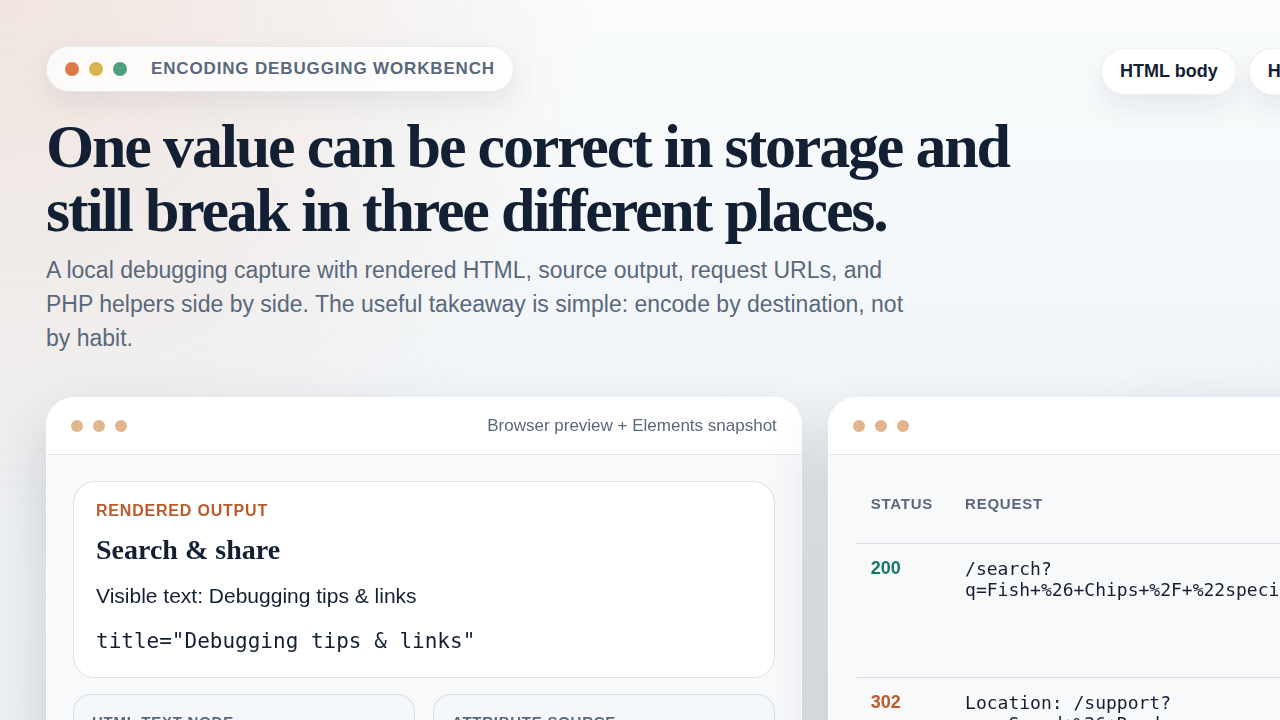
A useful debugging question is: am I looking at a literal HTML entity in the browser, or at the original source that the browser already decoded? Those are different observations. In DevTools, the page can visibly show & while the Elements panel reveals that the attribute source is &. That difference is often where the bug hides.
How To Spot Partial Encoding
Partial encoding is one of the more annoying cases because it can look almost correct. A title attribute may survive because quotes were escaped, while the same value inside a link query still breaks because the ampersand stayed raw. Or the visible page text looks fine, but copying the URL exposes a second problem. When only some characters are transformed, developers often lose time arguing about whether the data is “already encoded.”
A better question is narrower: which exact characters changed, and which destination was that change meant for? If only & changed to &, you probably passed through an HTML-oriented step. If spaces changed to + or %20, you are looking at URL-oriented logic. That observation usually tells you which layer touched the value last.
HTML Encoding Vs. Entities: The Practical Difference
In everyday development, people often say “HTML encoding” when they really mean “escape this value for safe HTML output.” In PHP, that is usually htmlspecialchars(). It converts the characters that matter most in HTML parsing, rather than converting every possible character to an entity.
That makes the distinction practical:
- HTML entities describe the text representation you may see in markup, such as
&or". - HTML escaping is the step you perform before output so that the browser treats user data as text, not as markup.
Here is a small comparison using the same raw value:
| Raw value | Output destination | Correct result |
|---|---|---|
Fish & Chips |
HTML body text | Fish & Chips in source, visible as Fish & Chips |
"special" |
Quoted attribute | "special" in source so the attribute remains intact |
/support?tab=logs |
URL query value | %2Fsupport%3Ftab%3Dlogs if used as a parameter value |
The key difference is not philosophical. It is operational. If you pass a value through htmlspecialchars() and then use that same value inside a query string, you have solved the wrong problem. The page may look tidy while the request is still broken.
It is also useful to separate htmlspecialchars() from htmlentities(). In many PHP codebases, htmlspecialchars() is the safer default for output escaping because it focuses on the characters that change HTML parsing. htmlentities() can convert a wider range of characters into named entities where available, which may be fine for specific documentation or export cases, but it is not automatically a better debugging choice. When a team is already confused about what changed, broader conversion can make the output harder to read.
URL Encoding: Spaces, Slashes, Plus Signs
URL encoding, or percent-encoding, prepares a URL component so reserved characters travel as data instead of being treated as separators. This matters most for query-string values, path segments, and redirect destinations.
Three characters cause disproportionate confusion:
- Space. In query-string style encoding, spaces often appear as
+. In raw percent-encoding, they appear as%20. Both can be valid depending on the helper and context. - Slash. A literal
/can separate path segments, but%2Fmeans “slash as data.” If something decodes it too early, a single value can unexpectedly turn into multiple path pieces. - Plus sign. In query strings, a
+may be interpreted as a space. If you mean a literal plus sign, it often needs to be percent-encoded as%2B.
This is why whole-URL encoding is usually a bad instinct. You rarely want to percent-encode an entire already-structured URL. You usually want to encode the pieces that are still raw data, then assemble the URL from those pieces.
For example, this is the safer pattern for query strings:
$params = [
    'q' => $searchTerm,
    'redirect' => '/support?tab=logs',
];

$url = '/search?' . http_build_query($params);
And this is where trouble starts:
$url = '/search?q=' . rawurlencode($searchTerm);
$url = rawurlencode($url); // usually the wrong layer
Once you see %252F, read it as a clue. The browser is not being mysterious. It is telling you that %2F was itself treated as raw text and encoded again.
The Double-Encoding Checklist
When a bug looks encoded but still breaks, run through this short checklist.
- Log the raw input before any output helper runs. You need one trustworthy observation point.
- Log the transformed value immediately after each helper. If two different layers both modify the value, the sequence becomes visible.
- Inspect the browser’s Elements panel. Visible page text and underlying HTML source are not the same thing.
- Inspect the Network tab. The actual request URL often reveals whether a query value was encoded once or twice.
- Check headers for redirects. The
Locationheader must contain a valid URL, not HTML entities. - Search for decoding calls. A hidden
urldecode()orhtml_entity_decode()can undo a correct step and make the later output layer look guilty.
One of the more reliable habits is to keep a tiny test page that echoes the same sample value into multiple destinations: HTML text, an attribute, a query string, and a redirect preview. That gives you a controlled baseline before you start debugging the larger application.
A Safe Debugging Workflow In PHP
Here is a practical workflow that keeps the moving parts separate.
1. Start With One Known Input
Use a value that contains the characters most likely to expose a bug: angle brackets, ampersands, quotes, spaces, slashes, and maybe a plus sign. For example:
$sample = '<tag attr="x"> Fish & Chips / A+B';2. Keep The Stored Value Raw
Do not pre-escape or pre-encode the database field just because you know it will later appear on a page. Storage is not the same as presentation. If you store the presentation form, every later consumer inherits that decision, even when it is the wrong one.
3. Encode At The Last Responsible Moment
Right before output, choose the helper that matches the destination.
- HTML text or attribute:
htmlspecialchars($value, ENT_QUOTES, 'UTF-8') - Query values:
http_build_query()for the parameter array - Path segment data:
rawurlencode($segment)when you truly need a path piece, not a whole URL
4. Verify With A Minimal Page
If the production template is complicated, reduce the test. Create a minimal page that only prints the value into the exact context you care about. This is often faster than reading a large template stack and trying to infer who encoded what.
5. Record The Final Observation
Before closing the ticket, capture the fixed request URL, the fixed HTML source, and one short note explaining which layer was responsible. If you later need to compare it with traffic or referrer behavior, the RedKernel Referer Tracker and the Reports & Tracking section are natural places to cross-check what the application actually emitted.
Worked Example: One Form Value, Three Outputs
Suppose a support form lets a user submit the label Fish & Chips / "special". That single value may end up in three different places during one request.
- Confirmation text on the page. Here the value belongs in an HTML text node, so escaping for HTML output is the right move.
- A
data-labelattribute used by a small UI script. The same HTML escaping step is still appropriate, but the attribute must stay quoted and intact. - A redirect to a filtered support dashboard. Now the value belongs in a query parameter, so you build a valid URL from raw pieces and URL-encode the parameter value.
The wrong shortcut is to escape once and reuse everywhere. The right workflow is to keep the raw value available until each destination is known. That may feel repetitive at first, but it is exactly what keeps one correct page render from turning into one incorrect redirect.
Common Mistakes To Avoid
- Encoding too early. This creates rigid data that later flows cannot reuse safely.
- Decoding user input “for convenience.” Early decoding often creates ambiguity and pushes risk downstream.
- Using HTML entities in redirects or APIs. Headers and transport values need URL-safe forms, not HTML-safe forms.
- Encoding the whole URL instead of the dynamic piece. This usually destroys the URL structure.
- Assuming visible browser text proves the source is correct. The browser may already have decoded or normalized what you are seeing.
If you are comparing multiple fixes or reviewing a regression, the blog archive and the homepage can also help you keep related guidance in one place instead of scattering one-off notes across tickets.
Reference Cheat Sheet: Encode Here, Not There
| Scenario | Encode here | Not here |
|---|---|---|
| Display user text inside a paragraph | htmlspecialchars() at render time |
Database storage layer |
| Put user text inside a quoted attribute | htmlspecialchars(..., ENT_QUOTES, 'UTF-8') |
JavaScript or CSS layers that never see the value |
| Build a query string | http_build_query() on the parameter array |
HTML escaping the finished URL |
| Build a redirect target | Construct a valid URL from encoded pieces, then send Location |
Replacing ampersands with HTML entities in the header |
| Show a literal entity example in documentation | Write the entity form in HTML content | Treating it as a universal security step |
A small neutral resource can also help if you want to prototype an internal comparison tool for raw, escaped, and URL-encoded values: this web app generator is one way to scaffold that kind of side-by-side testing utility quickly.
Closing Note
Context matters more than vocabulary here. You do not need to win an argument about whether a team member said “entities,” “escaping,” or “encoding” with perfect precision. You do need to know whether the next destination is an HTML text node, an attribute, a query parameter, or a redirect header. Once that is clear, the right helper usually becomes obvious.
Keep the raw value stable, encode only at the destination, and verify what the browser or server actually received. That simple discipline prevents most encoding bugs before they become security bugs.