A small toolkit is supposed to reduce risk, not quietly spread the same mistake to every project. If your PHP helpers mix URL encoding, HTML escaping, hashing, and encryption behind vague names, the failure mode is predictable: broken output first, security confusion next, and a cleanup task later when nobody remembers which function returned what.
Most developers arrive here with a short list of practical questions. Which functions belong in a reusable toolkit? Where should encoding happen in the request flow? When does hashing solve the problem, and when does encryption belong instead? Those are the right questions. As Edsger W. Dijkstra put it, “Simplicity is prerequisite for reliability.” The shortest path to reliability is clear boundaries, not more helper functions with friendlier names.
The risk is not theoretical. Output handling errors remain a common source of avoidable bugs, and the OWASP Cross Site Scripting Prevention Cheat Sheet still exists for a reason. On the PHP side, the core rules are equally plain: functions such as htmlspecialchars() are context tools, not universal “make safe” buttons. When a team blurs those boundaries, copy-paste code becomes a bug distribution system.
In this guide, I will build a minimum safe setup for a “Sources & Functions” toolkit: what belongs in it, how to structure it, what each function should accept and return, and how to test it before you trust it. I will also show where small browser tools and quick validation pages fit into the workflow without letting them become your only line of defense. If you need broader context around the site’s utilities, start from the home page, the Sources/Functions… library, or the Support page.

What belongs in a “Sources & Functions” toolkit, and what does not
A useful toolkit is not a junk drawer. It should contain small, predictable functions that do one job, name that job clearly, and return one kind of output. If a helper changes behavior based on mood, input shape, or an optional flag nobody documents, it does not belong in the safe pile.
Keep these categories in scope:
- Normalization helpers: trim input, normalize line endings, enforce UTF-8 expectations, reject invalid binary when text is required.
- Encoding and escaping helpers: URL component encoding, query-string building, HTML text escaping, HTML attribute escaping, Base64 transport helpers.
- Hashing helpers: password hashing and verification, keyed digests for integrity checks, deterministic fingerprints only when the use case truly needs them.
- Encryption helpers: authenticated encryption wrappers that require correct key length, generate fresh nonces, and reject malformed payloads.
- Validation helpers: email, token, identifier, or length validation when the rules are domain-specific and repeatedly used.
Leave these out:
- helpers that both validate and render output in one call
- helpers that return either raw text or HTML depending on a Boolean flag
- “secureString()” style wrappers with no declared context
- encryption helpers that silently generate a new key or hardcode one in source control
- anything that hides errors and returns a best guess
| Include | Why it helps | Exclude | Why it causes trouble |
|---|---|---|---|
| One-purpose encoding helpers | Predictable output contracts | Catch-all “sanitize” helpers | No clear destination context |
| Password hash / verify wrappers | Correct default algorithm handling | MD5 password helpers | Outdated and unsafe for password storage |
| Authenticated encryption wrappers | Confidentiality plus tamper detection | Homemade crypto schemes | Failure modes are subtle and expensive |
| Explicit query builders | Prevents broken separators and double-encoding | String-concatenated URLs | Easy to break, hard to review |
If you want a parallel set of downloadable utilities, the FREEWARES page is the natural internal companion. The important rule is the same either way: every helper needs a declared job and an obvious boundary.
A minimal module layout: input normalization, processing, then safe output
The simplest maintainable layout is a narrow pipeline:
- Normalize input into the type and character set you expect.
- Process the value with one clearly named function that solves one problem.
- Prepare output at the last responsible moment for the exact destination context.
A small module can look like this:
src/
  SourcesFunctions/
    Normalize.php
    Encode.php
    Hash.php
    Crypto.php
tests/
  SourcesFunctionsTest.php
The internal rule is plain: raw values move through normalization and business logic; rendered values exist only when you are about to emit them. That prevents the common failure mode where one layer stores an HTML-escaped string and the next layer URL-encodes it again because nobody can tell what state it is in.
For query strings, PHP already gives you a safer assembly path through http_build_query(). The same design principle applies across the toolkit: prefer narrow wrappers around well-understood platform functions instead of speculative abstractions that try to “handle everything.”
A small example of input normalization:
final class Normalize
{
    public static function text(string $value): string
    {
        $value = str_replace(["\r\n", "\r"], "\n", trim($value));

        if (!mb_check_encoding($value, 'UTF-8')) {
            throw new InvalidArgumentException('Expected valid UTF-8 text.');
        }

        return $value;
    }
}
This does not escape anything. That is deliberate. Normalization is about the baseline shape of the data, not about the place where you will render it later.
Function boundaries: encoding vs hashing vs encryption
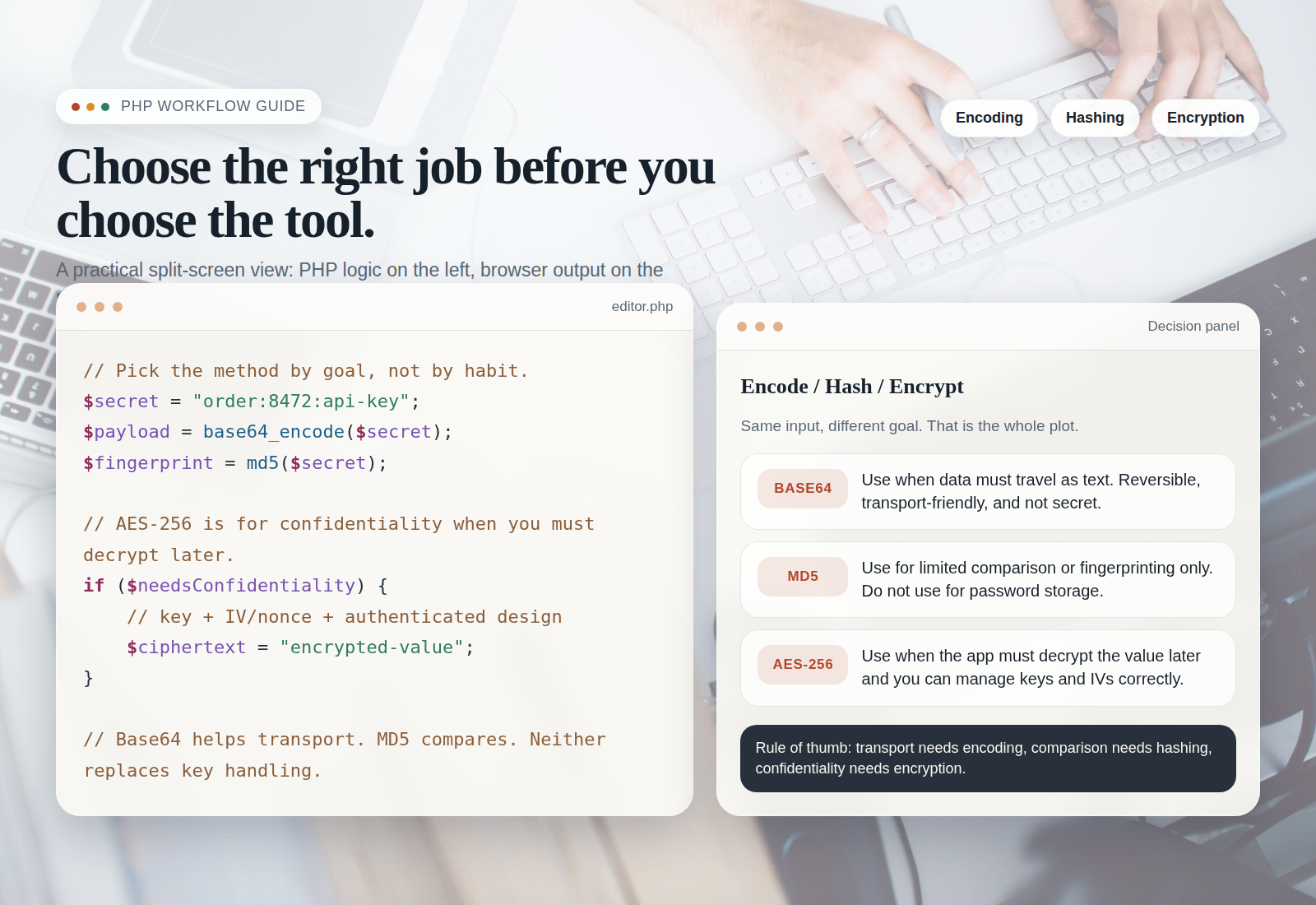
Most toolkit confusion starts here, so be blunt in code reviews: encoding, hashing, and encryption are different operations because they solve different problems.
| Function type | Primary goal | Input | Output | Do not use it for |
|---|---|---|---|---|
| Encoding / escaping | Represent data safely for a destination format | Known text or bytes | Destination-ready string | Confidentiality or integrity guarantees |
| Hashing | Verification, fingerprinting, password storage with the right API | Raw secret or raw text | Non-reversible digest | Rendering HTML or building URLs |
| Encryption | Confidentiality and later decryption | Plaintext plus managed key | Reversible ciphertext payload | Escaping browser output or replacing password hashing |
That table should drive your method signatures. Good boundaries look like this:
Encode::urlComponent(string $value): string
Encode::htmlText(string $value): string
Encode::htmlAttribute(string $value): string
Encode::base64(string $bytes): string

Hash::password(string $plainTextPassword): string
Hash::verifyPassword(string $plainTextPassword, string $storedHash): bool

Crypto::encrypt(string $plainText, string $binaryKey): string
Crypto::decrypt(string $payload, string $binaryKey): string
Bad boundaries look like this:
Toolkit::secure($value, $mode = 'auto')
Toolkit::sanitize($value)
Toolkit::prepare($value, $target, $secret = null)
If the function name does not tell a reviewer what the output contract is, the function is already too vague.
Practical PHP examples for the toolkit
The examples below are intentionally small. The goal is not to create a framework inside an article. The goal is to establish safe, reusable building blocks.
1. URL encoding for components, not entire finished URLs
final class Encode
{
    public static function urlComponent(string $value): string
    {
        return rawurlencode(Normalize::text($value));
    }

    public static function query(array $params): string
    {
        return http_build_query($params, '', '&', PHP_QUERY_RFC3986);
    }
}
Use urlComponent() for a single path or query value. Use query() when you are assembling a query string from parts. Do not encode the same component twice, and do not run rawurlencode() across an entire URL that already contains separators.
2. HTML entity encoding for text and attributes
final class Encode
{
    public static function htmlText(string $value): string
    {
        return htmlspecialchars(
            Normalize::text($value),
            ENT_QUOTES | ENT_SUBSTITUTE,
            'UTF-8',
            false
        );
    }

    public static function htmlAttribute(string $value): string
    {
        return self::htmlText($value);
    }
}
The key defaults are carrying real weight here: UTF-8, ENT_SUBSTITUTE so malformed sequences do not collapse into a fatal mess, and double_encode = false so you are less likely to turn already escaped entities into & clutter. That last flag is not a license to be careless; it is a guardrail, not absolution.
Rendering stays boring on purpose:
$label = Encode::htmlText($row['label']);
$href = '/inspect?' . Encode::query(['q' => $row['label']]);

echo '<a href="' . Encode::htmlAttribute($href) . '">' . $label . '</a>';
Notice the sequence. The query value is encoded for the URL context first. The finished URL is then escaped for the HTML attribute context. One logical value, two destinations, two distinct preparation steps.
3. Base64 as a transport step, not a secrecy feature
final class Encode
{
    public static function base64(string $bytes): string
    {
        return base64_encode($bytes);
    }

    public static function fromBase64(string $payload): string
    {
        $decoded = base64_decode($payload, true);

        if ($decoded === false) {
            throw new InvalidArgumentException('Invalid Base64 payload.');
        }

        return $decoded;
    }
}
Base64 is useful when binary data must travel through text-oriented channels. It does not hide secrets, prove integrity, or make browser output safe. Treat it as packaging, not protection.
4. Hashing with safe defaults
For passwords, use PHP’s password API rather than a general-purpose hash function. The PHP password hashing guidance remains the right baseline.
final class Hash
{
    public static function password(string $plainTextPassword): string
    {
        return password_hash($plainTextPassword, PASSWORD_DEFAULT);
    }

    public static function verifyPassword(
        string $plainTextPassword,
        string $storedHash
    ): bool {
        return password_verify($plainTextPassword, $storedHash);
    }
}
If you need a deterministic digest for a non-password use case, make that a separate method with a very specific name. Do not let a password helper quietly drift into token signing, file integrity, or cache keys.
5. Encryption when you must decrypt later
If the application must recover the original plaintext, use authenticated encryption and manage keys outside source control. PHP’s Sodium extension gives you a solid baseline through sodium_crypto_secretbox().
final class Crypto
{
    public static function encrypt(string $plainText, string $binaryKey): string
    {
        if (strlen($binaryKey) !== SODIUM_CRYPTO_SECRETBOX_KEYBYTES) {
            throw new InvalidArgumentException('Invalid key length.');
        }

        $nonce = random_bytes(SODIUM_CRYPTO_SECRETBOX_NONCEBYTES);
        $cipherText = sodium_crypto_secretbox($plainText, $nonce, $binaryKey);

        return base64_encode($nonce . $cipherText);
    }

    public static function decrypt(string $payload, string $binaryKey): string
    {
        if (strlen($binaryKey) !== SODIUM_CRYPTO_SECRETBOX_KEYBYTES) {
            throw new InvalidArgumentException('Invalid key length.');
        }

        $decoded = base64_decode($payload, true);

        if ($decoded === false || strlen($decoded) <= SODIUM_CRYPTO_SECRETBOX_NONCEBYTES) {
            throw new InvalidArgumentException('Invalid encrypted payload.');
        }

        $nonce = substr($decoded, 0, SODIUM_CRYPTO_SECRETBOX_NONCEBYTES);
        $cipherText = substr($decoded, SODIUM_CRYPTO_SECRETBOX_NONCEBYTES);
        $plainText = sodium_crypto_secretbox_open($cipherText, $nonce, $binaryKey);

        if ($plainText === false) {
            throw new RuntimeException('Decryption failed.');
        }

        return $plainText;
    }
}
That wrapper is still only the minimum safe setup. The real operational rule is that your key comes from an environment variable or secret manager, not from a constant checked into the repository. A crypto helper without a key-management plan is only half a tool.
Safe defaults: UTF-8, errors that fail closed, and no silent double-encoding
These defaults belong in the toolkit because they remove ambiguity before it spreads:
- UTF-8 everywhere for text: normalize early and reject invalid text where text is expected.
- Exceptions for malformed payloads: if Base64 decoding fails or a crypto payload is too short, stop and report it.
- No mixed return types: a method should not return
false, an array, or a string depending on the weather. - No hidden fallback behavior: do not silently swap to a weaker method because an extension is missing.
- Escape late: keep raw values until the destination context is known.
This is also the place to state one hard rule in team documentation: never store pre-escaped HTML as the canonical value unless the data model explicitly requires rendered HTML. For ordinary text fields, the canonical value should remain plain text. That keeps your recovery path intact when the same content later appears in an export, a report, a URL, or an API response.
If your project exposes diagnostics or audit pages, the Reports & Tracking section is a reminder that internal interfaces still render untrusted data. Browser-visible admin views are not exempt from output rules just because the public never sees them.
Testing checklist: representative inputs, edge cases, and output verification
A toolkit earns trust when its tests prove the boundaries hold under ugly input. Start with a small matrix that reflects how the code is actually used.
| Input sample | What it should test | Expected outcome |
|---|---|---|
alpha beta |
Spaces in query strings | Rendered as alpha%20beta in RFC 3986 query mode |
<script>"x"</script> |
HTML text and attribute escaping | Displayed as text, not interpreted as markup |
café |
UTF-8 handling | Remains readable across render paths |
100% ready & waiting |
Percent signs and ampersands | No accidental double-encoding |
| malformed Base64 or short cipher payload | Failure handling | Exception, not best-guess output |
Use a plain checklist alongside the tests:
- Verify URL helpers on individual components and on complete query-string assembly.
- Verify HTML output in text nodes and quoted attributes separately.
- Verify that invalid UTF-8, malformed Base64, and short encrypted payloads fail closed.
- Verify password hashing with both correct and incorrect passwords.
- Verify that encrypted values round-trip correctly with the same key and fail with the wrong key.
- Verify that logs, reports, and browser-based debug screens render special characters as text.
These tests do not need a giant framework to be useful. They need representative input, known expected output, and a reviewer who refuses to accept “looked fine in the browser once” as evidence.
How to pair the toolkit with Small Tools during development
The toolkit should be your source of truth. Small tools should be your quick inspection layer. That distinction keeps the workflow efficient without letting browser helpers become production logic.
A practical pairing looks like this:
- Use the toolkit in application code, tests, and CLI scripts.
- Use a local validation page or a small browser utility to inspect one sample value through URL encoding, HTML escaping, Base64 conversion, or decryption failure handling.
- Use internal pages such as Sources/Functions… for quick checks, but confirm the final behavior in automated tests.
- Use the contact page or Support if you need a second set of eyes before a risky production change.
If you are packaging the toolkit inside a broader internal utility, a neutral third-party web app generator can help scaffold an admin shell or dashboard faster. That can save setup time, but it does not change the core rule: your encoding, hashing, and encryption boundaries still need to be explicit and testable inside the generated application.
The quiet benefit of this workflow is speed with restraint. You can validate a suspicious string in seconds, then return to the codebase and keep the real logic in versioned PHP where it belongs.
Common pitfalls to avoid
- Mixed responsibilities: one function should not normalize, encrypt, escape for HTML, and log the result.
- Leaking secrets into logs: encrypted payloads, keys, raw tokens, and password-reset values do not belong in routine logs.
- Inconsistent encoding rules: if one module assumes UTF-8 and another quietly accepts anything, the error shows up later and further away.
- Using Base64 as if it were encryption: it is packaging, not protection.
- Using encryption where hashing belongs: passwords should be verified, not decrypted.
- Using one prepared string in every destination: HTML text, attributes, URLs, JSON, and logs each have different rules.
The repair strategy is usually simple even when the codebase is not: split the helper by job, name the output contract, add tests for the real destinations, and document the minimum safe setup. Preventable chaos is still chaos, but at least this version comes with a rollback path.
Final takeaway
A good “Sources & Functions” toolkit is small enough to review, strict enough to trust, and boring enough to survive reuse. That is a compliment. Store raw values, normalize once, choose the right function for the job, and prepare output only when the destination is known. The closer your helpers stay to those rules, the less likely they are to become a copy-paste liability.
Before your next deployment, pick one value that appears in a URL, in page text, and in an admin report. Trace it through your code. If you cannot explain which layer encodes it, hashes it, or encrypts it and why, that is the place to tighten the boundary first.