Whois is useful, but it is not a lie detector, a background-check tool, or a shortcut to certainty. If you treat it as a practical reference instead of a final verdict, it becomes much more helpful and much less risky.
Most readers who land on a Whois guide are trying to answer a few straightforward questions: Who manages this domain? When was it registered? Why do different lookup tools show different details? What is safe to display in a dashboard or report? Those are sensible questions. Whois data just happens to answer them unevenly.
For broader planning context, teams can compare guidance from web.dev guidance before choosing a workflow.
That is where many small teams get stuck. The lookup itself is easy. The hard part is knowing what the result actually means, what it does not mean, and how to present it without overstating ownership, exposing personal data, or building a workflow that breaks the moment a registry formats fields differently. A calm process helps more than a heroic amount of confidence.
In this guide, you will learn when Whois is genuinely useful, which fields deserve attention, where the common traps live, and how to turn raw lookup text into readable, cautious output. I will also include a simple developer checklist, a small normalization example, and a few practical next steps if you are adding domain lookups to a site tool or internal report.
For related site resources, you can browse the home page, the blog, the Support page, and the Reports & Tracking section.
Related implementation details are also covered in MDN Web Docs, which helps keep tool decisions grounded in established practices.
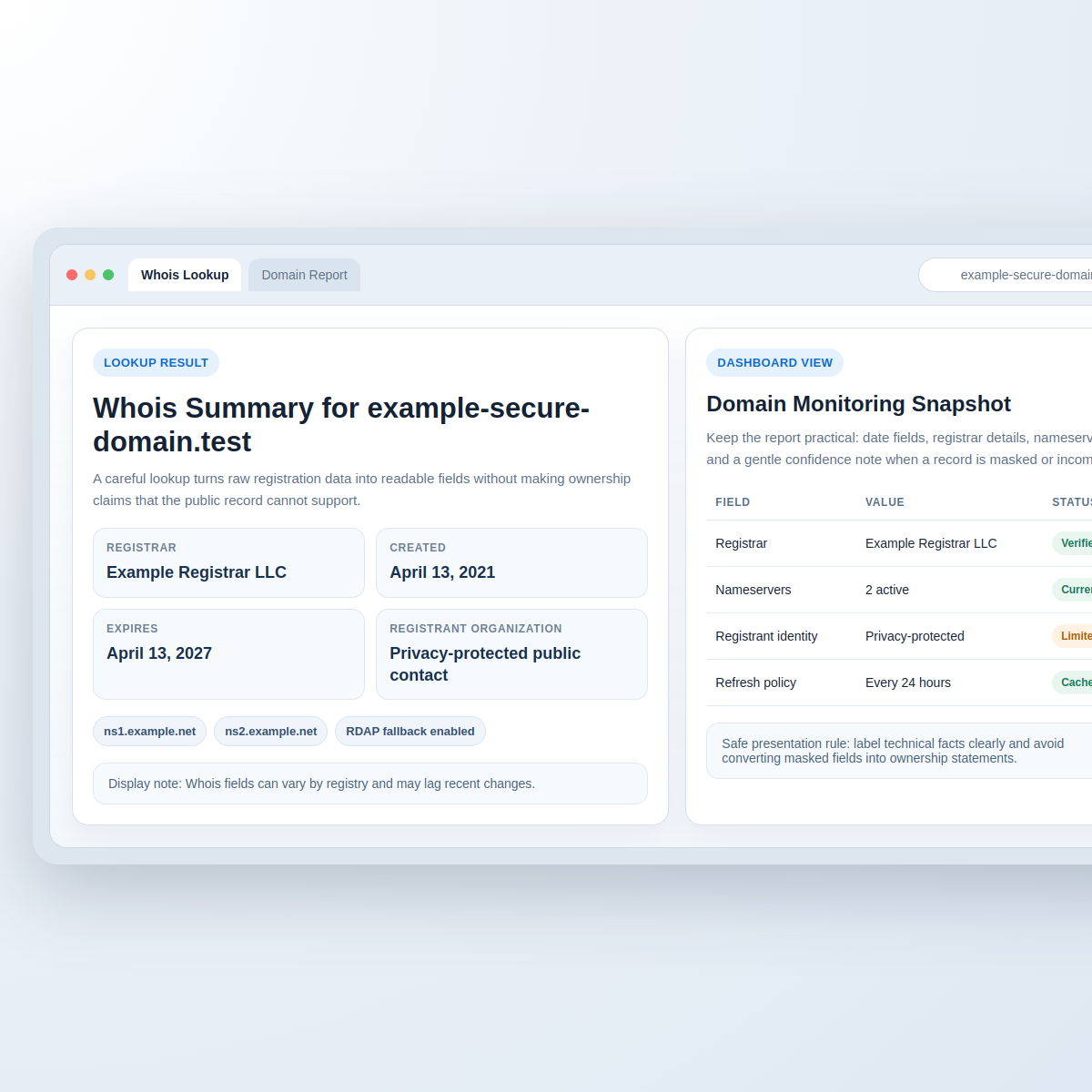
What Whois is good for, and what it is not
Whois is best used for operational context. It can help you understand registration timing, registrar relationships, name server setup, and whether a domain appears actively maintained. Those are useful signals for troubleshooting, renewal checks, migration planning, and basic domain inventory work.
Here are the kinds of questions Whois can often help answer:
- When was this domain created?
- When is it scheduled to expire?
- Which registrar currently manages it?
- Which name servers are published right now?
- Does the output suggest privacy protection or restricted registrant details?
That list is already useful for site owners and developers. It tells you whether a domain is new or long-running, whether a registrar transfer might be involved, and whether DNS changes you are seeing line up with the current record set.
What Whois should not be used for is making confident claims about a person or business identity when the data is partial, privacy-protected, stale, or inconsistent. A lookup result can point toward an administrative relationship. It does not automatically prove legal ownership, operational control, or real-world identity.
This distinction matters more than it first appears. If your support team labels a registrant field as “owner” when the record is privacy-masked, you have turned a weak signal into a strong public claim. That is a bigger leap than many dashboards admit.
Terminology that helps before you read the fields
Before you change anything in your workflow, it helps to slow the vocabulary down:
| Term | Plain-language meaning | What it usually tells you | What it does not guarantee |
|---|---|---|---|
| Registrar | The company through which the domain is registered | Where the registration relationship sits | Who actively runs the website day to day |
| Creation date | The recorded registration start date | How old the current domain registration is | How old the website content or business itself is |
| Expiration date | The next scheduled renewal deadline in the record | When renewal attention may be needed | That the domain will definitely stop working on that date |
| Name servers | The DNS servers published for the domain | Where DNS delegation points | Which hosting stack handles every service behind the domain |
| Registrant organization | The recorded organization when provided | A possible administrative signal | Verified beneficial ownership or identity |
| Privacy / proxy service | A masking layer that limits public contact details | That some personal or business fields are intentionally hidden | Suspicious intent on its own |
If you remember only one thing from this section, make it this: Whois fields are clues with context, not courtroom exhibits.
The key fields that matter most
Registrar
The registrar field is usually one of the cleaner parts of a Whois response. It helps you understand where registration actions such as renewal, transfer locks, and account-level settings may be managed. For a support workflow, that can save time quickly.
Still, it is worth keeping the wording careful. “Registrar” is not the same as “host.” It is also not the same as “site operator.” A domain can be registered with one company, use name servers from another provider, and be hosted somewhere else entirely.
Creation and expiration dates
These dates are often the first fields people notice, and for good reason. They are genuinely useful for domain lifecycle planning. A new creation date can explain why a domain has limited history. An expiration date can support renewal reminders or internal checks. An updated date can sometimes hint that a recent administrative change happened.
Even so, date fields deserve modest claims. A domain created in 2012 does not prove the current site has been live since 2012. An expiration date does not mean the domain will vanish on that exact minute. Grace periods, renewals, and registry-level timing can complicate the story.
Name servers
Name servers are especially useful for diagnostics. They can help you understand whether a domain is pointing to a managed DNS provider, whether nameserver changes have propagated into the public record, and whether a migration plan is aligned with what you expected to publish.
For articles and dashboards, this is one of the safer fields to surface because it is technical infrastructure data rather than identity data. Even here, keep the interpretation measured. Name servers show delegation, not the full application stack behind the site.
Registrant organization and contact details
This is where readers often want certainty and get ambiguity instead. Sometimes you will see a clear business name. Sometimes you will see a privacy service. Sometimes you will see partial text, older values, or nothing useful at all.
Do not turn a registrant field into a guaranteed ownership statement when privacy protection is present. A better label is usually “registrant organization (if provided)” or “public record contact field.” It is slightly less dramatic and much more accurate.
Common pitfalls that make Whois look more confident than it is
Inconsistent formatting
Different registries and lookup providers format results differently. One service may return a neat structured response. Another may hand you a block of text with mixed capitalization, repeated labels, or field names that shift from one TLD to another. If your parser assumes one exact pattern, it will eventually embarrass you.
Missing or masked fields
Some records omit details entirely. Others replace them with privacy-proxy values. That does not mean the domain is suspicious. It usually means the public record is intentionally limited. The safe design choice is to support empty states gracefully instead of filling gaps with inference.
Outdated snapshots
A Whois result may reflect data that has changed recently, especially around transfers, renewals, or name server updates. If two tools disagree, the answer is not always that one is “wrong.” They may simply be refreshing at different times or pulling from different paths through the registration ecosystem.
Rate limits and query pressure
Whois services are not an invitation to hammer a registry until it sighs. If you build an internal tool, use respectful query frequency, caching, and clear failure states. The goal is stable operations, not winning a speed contest against a public directory service.
Unsafe rendering
Raw lookup text can contain odd spacing, line breaks, mixed encodings, or strings you should not present as polished fact. If you dump raw output straight into a dashboard, you risk confusion at best and unsafe rendering bugs at worst. Normalize first. Label second. Display last.
A safe workflow: input validation to careful rendering
When I review small lookup tools, the best ones follow a simple sequence:
- Validate the input domain. Accept a domain or hostname format you actually expect. Reject raw URLs, unexpected protocols, and obviously malformed input before anything else.
- Run the lookup through one controlled path. Keep the lookup mechanism predictable so you know how failures and timeouts behave.
- Normalize the response. Convert raw field labels into your internal schema, trim whitespace, standardize date output, and preserve an “unknown” state where needed.
- Classify confidence. Treat registrar and nameserver data differently from registrant identity data. Not every field deserves the same presentation weight.
- Render cautiously. Escape output, avoid overconfident labels, and show readers when a field is masked, unavailable, or derived from partial data.
- Cache and log sensibly. Record success and failure conditions without stockpiling unnecessary personal or raw lookup data.
- Refresh on a schedule that fits the use case. Domain details usually do not need minute-by-minute polling. Calm systems are easier to trust.
If you are packaging this kind of workflow into a broader internal operations tool, a web app generator can be a useful resource for prototyping dashboards and forms. The important part, though, is the field logic and safe presentation layer, not the speed at which the shell of the app appears.
How to present results without overexposing or misleading
The display layer is where good intentions often go sideways. A few wording choices make a real difference:
- Prefer “registrar” over “provider” unless you know the provider role you mean.
- Prefer “public record contact” or “registrant organization (if provided)” over “owner.”
- Show “privacy-protected” or “not publicly listed” instead of implying a missing record is suspicious.
- Separate technical fields from identity-related fields so readers do not treat them as equally reliable.
- Use helper text such as “Whois data can vary by registry and may lag recent changes.”
A compact two-column display often works better than a dramatic “intelligence profile” layout. The second phrase sounds impressive and tends to invite claims the data cannot really support. Quiet clarity ages better.
Mini example: from raw text to readable output
Imagine you receive raw lookup text that includes extra spacing, mixed labels, and a privacy service in the registrant field. Instead of showing the text block directly, transform it into a small structured result:
| Raw value | Normalized field | Reader-facing output |
|---|---|---|
Registrar: Example Registrar LLC |
registrar_name |
Example Registrar LLC |
Creation Date: 2021-04-13T09:41:00Z |
created_at |
April 13, 2021 |
Registrant Organization: Privacy service provided |
registrant_org |
Privacy-protected public contact |
Name Server: NS1.EXAMPLE.NET |
nameservers[] |
ns1.example.net |
After normalization, sanitize output for HTML, trim repeated labels, standardize capitalization, and keep notes about what was transformed. That gives you a result that is easier to read and easier to defend.
A simple internal structure like this is enough for many tools:
{
  "domain": "example.com",
  "registrar_name": "Example Registrar LLC",
  "created_at": "2021-04-13",
  "expires_at": "2027-04-13",
  "nameservers": ["ns1.example.net", "ns2.example.net"],
  "registrant_org": null,
  "registrant_visibility": "privacy_protected",
  "notes": ["Whois fields may vary by registry"]
}
The important step is not the JSON itself. It is the discipline of keeping uncertain fields uncertain instead of decorating them into false confidence.
If you maintain small internal utilities, this is also where restraint pays off. A modest lookup widget that validates input, normalizes a few fields, and explains uncertainty clearly is often more useful than a crowded panel with ten badges and three confidence scores. Readers usually want clean facts, not theatrical certainty. If you are comparing lightweight utility ideas for staff use, the FREEWARES section is a sensible companion stop because it keeps the focus on practical tools rather than exaggerated promises.
Developer checklist for a calm, durable Whois tool
- Validate domain input early. Do not accept arbitrary URLs or unrelated text blobs when you only need a hostname.
- Normalize field names. Map variations into a small internal schema so your templates stay sane.
- Escape everything on output. Raw text should not go straight into HTML.
- Cache responses. This reduces repeated lookups and lowers the odds of hitting rate limits.
- Log outcomes, not more data than you need. Status, latency, and parser errors are often more useful than full raw responses.
- Support unknown values gracefully. An empty field is better than a guessed one.
- Label identity-related fields carefully. “Registrant organization” is safer than “owner.”
- Explain freshness. Readers appreciate a note about update timing when results vary between tools.
- Keep query frequency respectful. Stable operations matter more than constant refreshes.
- Review how results appear in reports. The Reports & Tracking area is a good mental model here: clean labels, limited assumptions, and obvious status handling.
Why one Whois tool may differ from another
This question comes up constantly, and the short answer is that different services can disagree for ordinary reasons. They may query different sources, apply different parsers, refresh at different times, or present privacy-protected data in different ways.
That means your workflow should never depend on exact text identity between providers. The safer approach is to normalize what you can, mark what is uncertain, and keep reader-facing language modest. When the goal is operational awareness, consistency in your presentation matters more than pretending the public record is perfectly uniform.
If you want more related reading after this guide, the posts on secure PHP input handling and safe referrer tracking pair well with Whois work because they cover the same broader theme: gather data carefully, interpret it honestly, and display it without creating new problems.
FAQ
Why does my Whois result differ from another lookup site?
Because the lookup path, refresh timing, parser rules, and privacy handling can differ. The underlying record may also have changed recently. Small formatting differences are common; field-level disagreement is not unusual either.
How often should I refresh Whois data?
Refresh based on the job, not on curiosity alone. For many internal dashboards, a cached result that updates on a sensible schedule is enough. Renewal checks and migration work may justify more frequent refreshes for a limited period, but constant querying is rarely the practical next step.
Can I use Whois to identify the real owner of a domain?
Not reliably in every case. Whois can provide ownership signals, but privacy services, missing fields, stale records, and registry differences all limit how confidently you can identify a real-world person or organization.
Should I show the raw Whois text block to users?
Usually no, at least not as the primary display. A structured summary with careful labels is easier to read, easier to sanitize, and less likely to turn messy raw data into accidental misinformation.
What is the safest first step if I want to build a lookup feature?
Start with the output schema. Decide which fields you will show, which labels you will use, how you will handle missing values, and what note you will display about privacy or data freshness. That design work prevents a lot of cleanup later.
Final takeaway
The safest way to use Whois is to treat it as operational context, not identity proof. It is very good at showing registration mechanics and technical signals. It is much weaker when people ask it to settle questions about real-world control or ownership.
If you are building or refining a lookup tool, the next sensible move is simple: validate input, normalize carefully, render modestly, and keep your labels honest. If you want help reviewing that workflow before you publish it, the Support page is the right place to continue.