Read this all the way through if you have ever watched a perfectly good URL turn into a broken redirect.
By Felix Rowan · Updated July 16, 2026
If you have ever asked yourself why a link turned into %2520, why a plus sign became a space, why a redirect worked in a test email but failed in production, or why a tracking parameter quietly swallowed the rest of the query string, you already know the real problem. The data is not mystical. The pipeline is just sloppy.
- Did the path break because one segment was encoded like a whole URL?
- Did a query parameter lose half its value because an ampersand was left loose?
- Did a redirect look fine in code and still fail once it hit HTML or headers?
- Did somebody decode the same value twice and call it “cleanup”?
I keep seeing the same failure pattern: someone encodes the wrong layer, then blames the browser for doing exactly what it was told. The boring fix is to encode the right thing at the right boundary. The PHP manual pages for rawurlencode() and http_build_query() exist for a reason, and the OWASP Output Encoding Cheat Sheet makes the same blunt point for HTML output: context matters or the output breaks. For the underlying syntax, RFC 3986 is still the boring standard sitting in the corner while everybody pretends links are simple.
When I read code like this, I ask the same questions every time: Is this a path segment or a query value? Is it going into HTML text or an attribute? Is this a redirect destination or a nested parameter inside another URL? And did somebody already encode it once before handing it to the next function? Tim Berners-Lee said the Web does not just connect machines, it connects people. Fine. Then it is worth getting the connectors right.
By the end of this guide, you should be able to build URLs in PHP without guesswork, spot the difference between URL encoding and HTML encoding, keep redirects from collapsing into confetti, and decode values only when you know which encoding they came from. That last part matters more than the rest. Double-decoding is how a small mistake grows teeth.
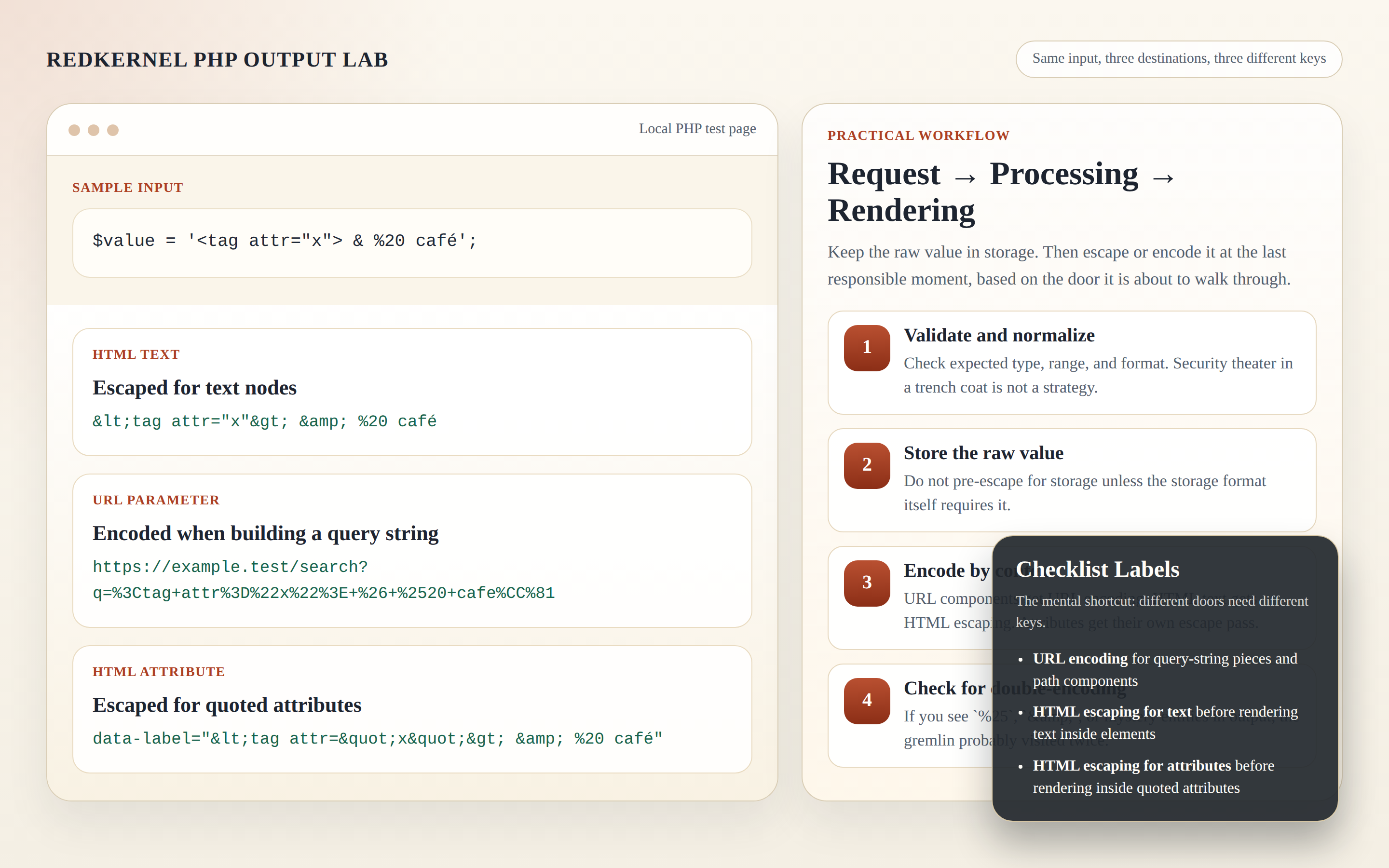
What the terms actually mean
People use “encoding” as a vague umbrella and then act surprised when the wrong umbrella leaks. These are different jobs.
| Term | What it does | When to use it in PHP |
|---|---|---|
| URL encoding | Converts characters into a URL-safe form, usually percent-encoding. | Query parameter values, path segments, redirect targets that are nested inside another URL. |
| Form encoding | Encodes data like an HTML form submission, where spaces often become +. |
http_build_query() with default settings and typical query strings. |
| HTML encoding | Turns characters like <, >, &, and quotes into HTML-safe entities. |
When you output text or attribute values into HTML. |
| Entity encoding | Usually a loose way of describing HTML entity encoding. | Same place as HTML escaping: final HTML output, not stored data. |
That table is the whole argument in miniature. URL encoding keeps link syntax intact. HTML encoding keeps markup intact. They are not interchangeable. If you put HTML entities into a query string, the URL is still wrong. If you put percent-encoding into visible HTML text, the page may render, but you have solved the wrong problem.
The annoying cousin here is form encoding. In query strings, + often represents a space. That is convenient until somebody stuffs a nested URL inside another URL and the outer parser decides the plus sign should mean space instead of literal plus. At that point, your “simple” link has become a crime scene.
The three places you must encode in PHP
1) Path segments
Paths are where people get sloppy because a slash looks harmless until it is not. Encode each segment, not the whole path. If you encode the whole path string, you will often destroy the separators you still need.
Rule: encode one path segment at a time with rawurlencode().
$category = 'summer sales / 2026';
$slug = rawurlencode($category);
$url = '/docs/' . $slug . '/';
That becomes something like /docs/summer%20sales%20%2F%202026/. Notice what happened: the slash inside the data became %2F, but the path separators around the segment stayed as slashes. That is the point. The browser does not get to guess which slash you meant.
2) Query strings
Query strings are where most tracking bugs are born. Someone concatenates a few parameters by hand, misses one ampersand, and suddenly the rest of the parameters are hostage to the first one.
Rule: let http_build_query() build the query string for you. When you need strict percent-encoding for spaces, use PHP_QUERY_RFC3986.
$params = [
    'q' => 'red kernel & blue',
    'page' => 2,
    'sort' => 'newest',
];

$query = http_build_query($params, '', '&', PHP_QUERY_RFC3986);
$url = '/search?' . $query;
That example gives you a query string that is readable, predictable, and not hand-stitched from wishful thinking. If you need the PHP manual note for the exact syntax, the http_build_query() page is short and blunt, which is a blessing.
There is a second rule here that saves embarrassment: if the value is already a full URL and you are putting it into a parameter, encode the parameter value, not the final URL as a whole. That distinction matters more than people admit.
3) Redirect targets
Redirects deserve paranoia. The browser follows Location headers literally. If you hand it garbage, it will deliver garbage with confidence.
Rule: build the redirect target as a real URL first, validate it, and then send it in the header. Do not encode the entire Location string into one giant percent-blob unless the redirect mechanism specifically expects a nested encoded parameter.
$next = '/reports/tracking?source=' . rawurlencode('email campaign');

if (!str_starts_with($next, '/')) {
    $next = '/';
}

header('Location: ' . $next, true, 302);
exit;
If you are building a redirect service that stores the target inside another URL, encode the target as a parameter value:
$destination = 'https://example.test/path?a=1&b=2';
$jump = '/go.php?' . http_build_query([
    'next' => $destination,
], '', '&', PHP_QUERY_RFC3986);
When you later read that value back, decode exactly once. Not twice. Not “just to be safe.” That phrase has ruined enough code already.
Safe query-string building without hand-rolled mistakes
If I see string concatenation like '?a=' . $a . '&b=' . $b, I assume nobody is watching the border. That may feel dramatic. It is just accurate.
Use http_build_query() because it does three useful things at once:
- It encodes parameter values consistently.
- It handles arrays and nested data without improvisation.
- It keeps ampersands and equals signs in the places they belong.
Here is a more realistic example for a tracking link:
$link = '/rkrt/rkrt_stats.php?' . http_build_query([
    'campaign' => 'newsletter july',
    'source'   => 'blog',
    'target'   => '/support',
], '', '&', PHP_QUERY_RFC3986);
That gives you a clean reporting URL with normalized parameters. If you need a cleanup step for a messy stored URL before you rebuild it properly, the site’s Remove URL tool is the sort of thing you use after the fact, not instead of encoding discipline. There is a difference between cleanup and engineering, even if people keep pretending there is not.
One more thing: if the output will be shown inside HTML, the final URL still needs HTML escaping before it lands in an attribute. Build the URL first, then escape the attribute value.
$href = '/search?' . http_build_query(['q' => $term], '', '&', PHP_QUERY_RFC3986);
echo '<a href="' . htmlspecialchars($href, ENT_QUOTES, 'UTF-8') . '">Search</a>';
The URL layer and the HTML layer are separate borders. If you skip one, the other does not forgive you.
Redirect-safe patterns: encode the target or the pieces?
This is the part where people usually overcorrect. They either encode nothing, or they encode everything into a single unreadable string and call it secure. Both are bad habits.
Use this rule:
- If the value is a parameter inside another URL, encode that parameter value.
- If the value is the final redirect target, keep it as a real URL string and validate it before sending it.
- If the redirect target is relative, prefer a relative path with a whitelist or prefix check.
Example: a campaign link that forwards to a page and preserves a search term.
$target = '/search?' . http_build_query([
    'q' => 'red kernel links',
    'page' => 1,
], '', '&', PHP_QUERY_RFC3986);

header('Location: ' . $target, true, 302);
exit;
Example: a redirect service that receives a destination as a parameter.
$next = $_GET['next'] ?? '/';

if (preg_match('#^/[A-Za-z0-9/_\-\.\?=&%]+$#', $next) !== 1) {
    $next = '/';
}

header('Location: ' . $next, true, 302);
exit;
That validation is intentionally plain. It is not glamorous. It is also cheaper than an open redirect incident.
For reporting and source analysis, a normalized view such as RKRT Statistics is where decoded and cleaned data belongs. Raw, half-decoded query strings belong nowhere near a report table unless you enjoy lying to yourself.
Decoding on the way back: urldecode or rawurldecode?
This is where developers create bugs by being “helpful.” They decode values that PHP already decoded, and then they wonder why literal plus signs vanish or why a path segment comes back mangled.
Use urldecode() when you are reversing standard query-string style encoding that may have used + for spaces. Use rawurldecode() when you are reversing percent-encoding that should not treat plus as space. And if the value came from $_GET, remember that PHP already parsed and decoded it once for you.
That means this is often wrong:
$q = urldecode($_GET['q']); // usually unnecessary and sometimes harmful
And this is usually enough:
$q = $_GET['q'] ?? '';
If you manually split a path segment out of a URL, use rawurldecode() on that segment only:
$segment = rawurldecode($segmentFromRoute);
The distinction matters because decoding is not a generic “make it normal” button. It is a reversal step for a specific earlier encoding step. If the earlier step was different, your reversal should be different too.
For the exact behavior of the PHP helpers, the manual pages for urldecode() and rawurldecode() are the source of truth. Use them. The browser is not going to rescue your assumptions.
Checklist: what to do before you generate a tracking link
I use a blunt checklist because vague intentions are cheap and broken links are not.
- Keep raw values in storage. Do not store pre-escaped or pre-encoded strings unless the storage format explicitly requires it.
- Encode at the final boundary. Encode when the value becomes a URL, a query string, or an HTML attribute.
- Use
rawurlencode()for path segments. Never encode the entire path if only one segment is variable. - Use
http_build_query()for query strings. Stop hand-building ampersands unless you enjoy debugging ampersands. - Use
htmlspecialchars()for HTML output. A correct URL can still break when dropped into a quoted attribute. - Do not decode twice. If PHP already parsed
$_GET, do not “fix” it again. - Validate redirect targets. Prefer relative paths or allowlisted hosts. Never trust an unchecked
nextparameter. - Normalize before reporting. A reporting view should consume cleaned values, not raw fragments with inconsistent encodings.
- Log minimally. Track the fact that a redirect happened, not every secret that passed through it.
If that looks strict, good. Loose encoding rules are how sites end up with broken funnels, false tracking numbers, and support tickets that say “the link is weird” because nobody wants to type the actual symptom.
Troubleshooting table: the common failures and the fix
| Symptom | Likely cause | Fix |
|---|---|---|
%2520 appears instead of %20 |
Double-encoding. The first % was encoded again. |
Store the raw value and encode only once at the final output boundary. |
| A plus sign turns into a space | You used query/form encoding where the value was meant to be a literal plus or a nested URL. | Use rawurlencode() for path pieces and PHP_QUERY_RFC3986 when building query strings that must preserve literal characters. |
| The redirect target loses part of its query string | You concatenated a nested URL into another URL without encoding the nested value. | Put the nested URL into http_build_query() as a parameter value. |
Malformed UTF-8 or odd replacement characters appear in output |
The data is not valid UTF-8, or the output routine is strict about encoding. | Validate input, normalize text early, and use htmlspecialchars($value, ENT_QUOTES | ENT_SUBSTITUTE, 'UTF-8') for HTML output. |
A path like /docs/a/b breaks into two pieces |
You encoded or split the whole path incorrectly instead of handling each segment. | Encode each segment separately with rawurlencode(). |
| An open redirect sneaks through | You trusted a redirect parameter without checking what it pointed to. | Allowlist relative paths or approved hosts before sending the Location header. |
The middle rows are the ones that catch people. “It worked in my test” is not a security model. Neither is “the browser seemed fine.”
Quick PHP examples you can copy
Build a search link safely
$params = [
    'q' => $searchTerm,
    'page' => 1,
];

$href = '/search?' . http_build_query($params, '', '&', PHP_QUERY_RFC3986);

echo '<a href="' . htmlspecialchars($href, ENT_QUOTES, 'UTF-8') . '">Search</a>';
This is the normal pattern: encode the query string, then escape the final attribute for HTML. No drama. No mystery. No handmade bugs.
Build a path from clean segments
$section = rawurlencode('release notes');
$page = rawurlencode('July 2026');
$href = '/docs/' . $section . '/' . $page . '/';
Each segment gets its own encoding. That is what keeps the path structure intact.
Read a redirect parameter and validate it
$next = $_GET['next'] ?? '/';

if (!str_starts_with($next, '/')) {
    $next = '/';
}

header('Location: ' . $next, true, 302);
exit;
If the parameter might contain a full URL, do not skip validation and hope. Parse it, compare it to an allowlist, and reject the rest. Hope is not a parser.
Decode a manually encoded segment
$segment = rawurldecode($routePart);
Only reverse what you actually encoded. That sounds obvious until somebody does the opposite in production and then spends an afternoon arguing with the logs.
Where tracking links usually go wrong
Tracking links are simple in the abstract and obnoxious in practice. The broken cases repeat:
- A campaign URL is inserted into a parameter without encoding.
- The query string is assembled by hand and one ampersand goes missing.
- A value is decoded twice, so the literal plus sign disappears.
- The reporting view receives raw values that were never normalized.
- Someone copies a redirected URL into HTML without escaping the attribute.
That last one is almost funny. A URL can be structurally correct and still break because the HTML wrapper was lazy. The browser only sees the final output. It does not care what you meant.
For this site’s own tooling, that means the cleaning step belongs with Remove URL, the reporting step belongs with RKRT Statistics, and the general troubleshooting path belongs on the Blog when the pattern needs more explanation. If the link still refuses to behave after that, the Support page is the next sane stop. The home page is there for navigation, not moral support.
If a team later needs to connect AI to existing systems rather than bolt on another isolated tool, one neutral example is AI integration services. The useful part is not the label. It is the habit of integrating workflow changes cleanly instead of hand-wiring them and hoping the seams disappear.
Conclusion: the rule is not complicated
I would love to tell you URL encoding is deep philosophy. It is not. It is mostly disciplined boundary handling. Encode the right layer, once, at the right time. Use rawurlencode() for path segments, http_build_query() for query strings, htmlspecialchars() for HTML output, and rawurldecode() or urldecode() only when you are reversing the exact matching format.
The first diagnostic step is simple: identify the output context before you touch the value. Is it going into a URL, a redirect, an HTML attribute, or a report? That answer decides the function. Everything else is busywork, and not the good kind.
Key points to remember:
- URL encoding is for URL syntax, not HTML.
- HTML encoding is for browser output, not links.
http_build_query()is safer than hand-building query strings.- Encode path segments separately, not entire paths.
- Decode once, and only when you know which encoding produced the value.
- Validate redirect destinations before sending them.
- Normalize tracking data before you report on it.
If you want more practical PHP debugging notes, the Blog is where the site keeps the useful pieces, and the Support page is where you go when the boring checklist still does not solve the problem. That is usually the real end of the story. The rest is just people arguing with percent signs.