PHP stays manageable when every value has a job, a boundary, and a next step. That is the difference between a workflow and a pile of helpers. The moment raw input, normalized values, URL encoding, HTML escaping, and logging are treated as the same kind of operation, links start breaking and reports stop making sense.
The Sources & Functions section is the right place to keep that boundary discipline visible. If the value is coming from a request, a referrer, or a tool output, it should move through one clear transformation at a time. When the path grows into RedKernel Referer Tracker or Reports & Tracking, that discipline is what keeps the data readable. The home page should feel just as orderly.
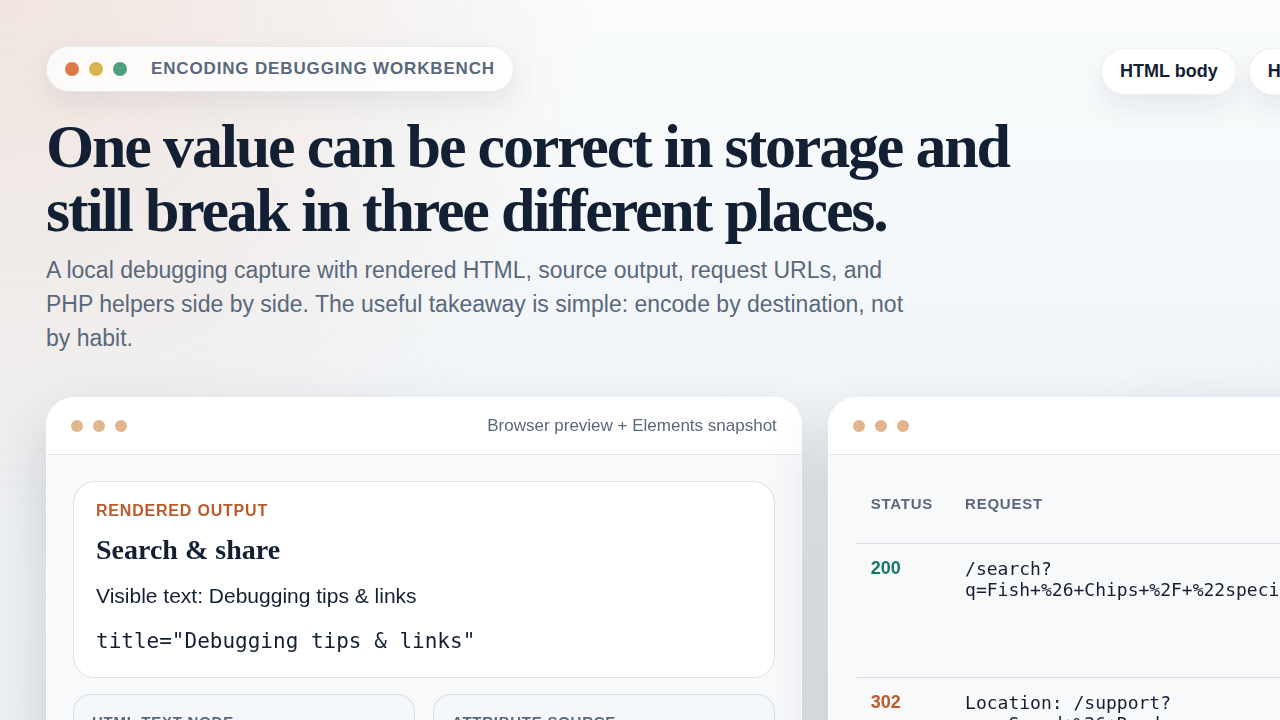
What “sources and functions” means in day-to-day PHP work
In this context, a source is any place a value enters the system: a query string, a referrer, a form field, a header, or a stored record pulled back for reporting. A function is the one transformation you apply to that value: normalize it, encode it, validate it, hash it, encrypt it, or log it.
The point is not the function name. The point is the boundary. A source tells you what kind of data you are holding. A function tells you what job the data is allowed to do next. That is why a small utility page is useful only when it does one job cleanly. The FREEWARES page is the right place for lightweight helpers; the Support page is where you go when the boundary rules are already broken.
| Item | Example | Job |
|---|---|---|
| Source | Request URL, referrer, form input, stored row | Provide raw material |
| Function | rawurlencode(), http_build_query(), htmlspecialchars(), error_log() |
Transform one layer only |
| Contract | Raw, normalized, encoded, stored | Define what the value may become next |
That contract matters because a value that is safe for storage is not automatically safe for HTML, and a value that is safe for a URL is not automatically safe for a log line. The PHP manual for rawurlencode() and the manual for http_build_query() both make the same quiet point: context decides the correct output.
Define your data contracts
Before you write code, name the states a value can move through. If you do not name them, you will end up encoding the same value twice or decoding it at the wrong time and then blaming the browser.
| State | What it means | What to do with it |
|---|---|---|
| Raw input | The original value as received | Validate, normalize, and keep it separate from output |
| Normalized value | A cleaned value with stable case, spacing, or format | Use for matching, deduplication, and reporting |
| Encoded value | A value prepared for a specific output layer | Use only at the boundary it was meant for |
| Stored value | The version saved in a database, file, or log | Prefer raw or normalized storage, not display-escaped text |
The rule that keeps the whole system sane is simple: store once, encode late, and decode only the exact transform you already applied. If you store display-escaped text, exports and reports will spend weeks paying for it.
Step-by-step workflow
A repeatable workflow is easier to maintain than a stack of clever shortcuts. Use the same order every time:
- Capture the source. Read the request URL, referrer, or form field as raw input.
- Normalize the value. Trim it, standardize case where needed, and remove noise that should not affect reporting.
- Validate the shape. Check whether the value matches the expected format before you keep it.
- Prepare the display version. Escape for HTML with
htmlspecialchars()only when outputting into a page. - Prepare the URL version. Build links with
http_build_query()orrawurlencode()depending on the shape of the data. - Store the clean record. Save raw plus normalized fields if needed, but keep display encoding out of storage.
- Log the action. Write a minimal record that helps you debug without exposing secrets.
$rawSource = $_GET['source'] ?? '';
$normalizedSource = strtolower(trim($rawSource));
$normalizedSource = preg_replace('/s+/', ' ', $normalizedSource);

$reportUrl = '/reports-tracking?' . http_build_query([
    'source' => $normalizedSource,
    'page'   => 'overview',
], '', '&', PHP_QUERY_RFC3986);

$safeLabel = htmlspecialchars($normalizedSource, ENT_QUOTES | ENT_SUBSTITUTE, 'UTF-8');

error_log(json_encode([
    'event'  => 'source_seen',
    'source' => $normalizedSource,
    'time'   => gmdate('c'),
], JSON_UNESCAPED_SLASHES | JSON_UNESCAPED_UNICODE));
That example keeps the layers apart. The normalized value can feed reporting, the URL is built from parameters, the label is escaped for HTML, and the log entry stays compact. If the workflow later needs to connect with existing internal tools, a neutral reference point is AI integration services, because any automation still has to respect the same data contract when it touches production systems.
Where each transformation belongs
The best way to avoid confusion is to decide where each transformation lives and where it does not live.
| Transformation | Use it for | Do not use it for |
|---|---|---|
| Normalization | Case folding, trimming, deduplication, cleanup | Final browser output |
| URL encoding | Path segments, query values, nested redirect targets | Visible HTML text |
| HTML escaping | Text nodes and attributes in a web page | Database storage |
| Hashing | Integrity checks, token fingerprints, deduplication | Recovering secrets |
| Encryption | Values that must remain confidential but later readable | Making a URL safe or pretty |
If you need the browser-side rule, the htmlspecialchars() manual and the OWASP Output Encoding Cheat Sheet cover the same ground from two useful angles. The short version is simple: encode for the final context, not for the context you wish you had.
Key handling basics for reversible transforms
Not every workflow needs encryption. If a value only needs to travel safely in a URL or render correctly in HTML, encoding is enough. If you need confidentiality at rest, encryption belongs in the storage layer, and the key has to stay out of the request and log path.
Use reversible transforms only when you actually need the original value later. Common examples are API secrets, private notes, or internal identifiers that should not be readable in plain text. If the value only needs integrity checks, a hash is the better tool. If the value only needs to survive a URL or HTML boundary, encoding is the right tool.
Do not treat encryption as a shortcut for bad logging. If a field should never appear in logs, keep it out of the log record. Encryption protects stored confidentiality; it does not make careless operational habits acceptable. The URI syntax standard in RFC 3986 makes the same kind of boundary discipline feel unavoidable, because it is.
Logging that stays useful
Logs should help you answer three questions: what happened, where did it come from, and what did the system do with it. They should not become a pile of raw secrets or a duplicate copy of every request body.
Log the useful facts:
- event name
- normalized source
- landing path
- timestamp
- request or trace ID
- error code or validation result
Omit the noisy or risky facts:
- passwords
- session tokens
- full cookies
- raw auth headers
- unbounded query strings
function logTrackingEvent(array $event): void
{
    $record = [
        'event'  => $event['event'] ?? 'unknown',
        'source' => $event['source'] ?? 'direct',
        'path'   => $event['path'] ?? '/',
        'status' => $event['status'] ?? 'ok',
        'time'   => gmdate('c'),
    ];

    error_log(json_encode($record, JSON_UNESCAPED_SLASHES | JSON_UNESCAPED_UNICODE));
}
That style keeps log records consistent, readable, and easy to feed into later reporting. For a broader reporting path, keep the raw event in the logger, the cleaned event in the report, and the rendered version in HTML only after escaping.
Quick validation checklist
Run the same review every time. Predictable checks beat heroic debugging.
- Confirm that the source field is captured once, not re-parsed in three different functions.
- Check that the normalized value is stable across repeated submissions.
- Verify that URL parameters are built with
http_build_query()orrawurlencode(), not string concatenation. - Confirm that every HTML output path uses
htmlspecialchars()at the last boundary. - Review logs to make sure they are readable and do not expose secrets.
- Test one full round trip from request to report to render.
- Check that the same value does not appear encoded twice.
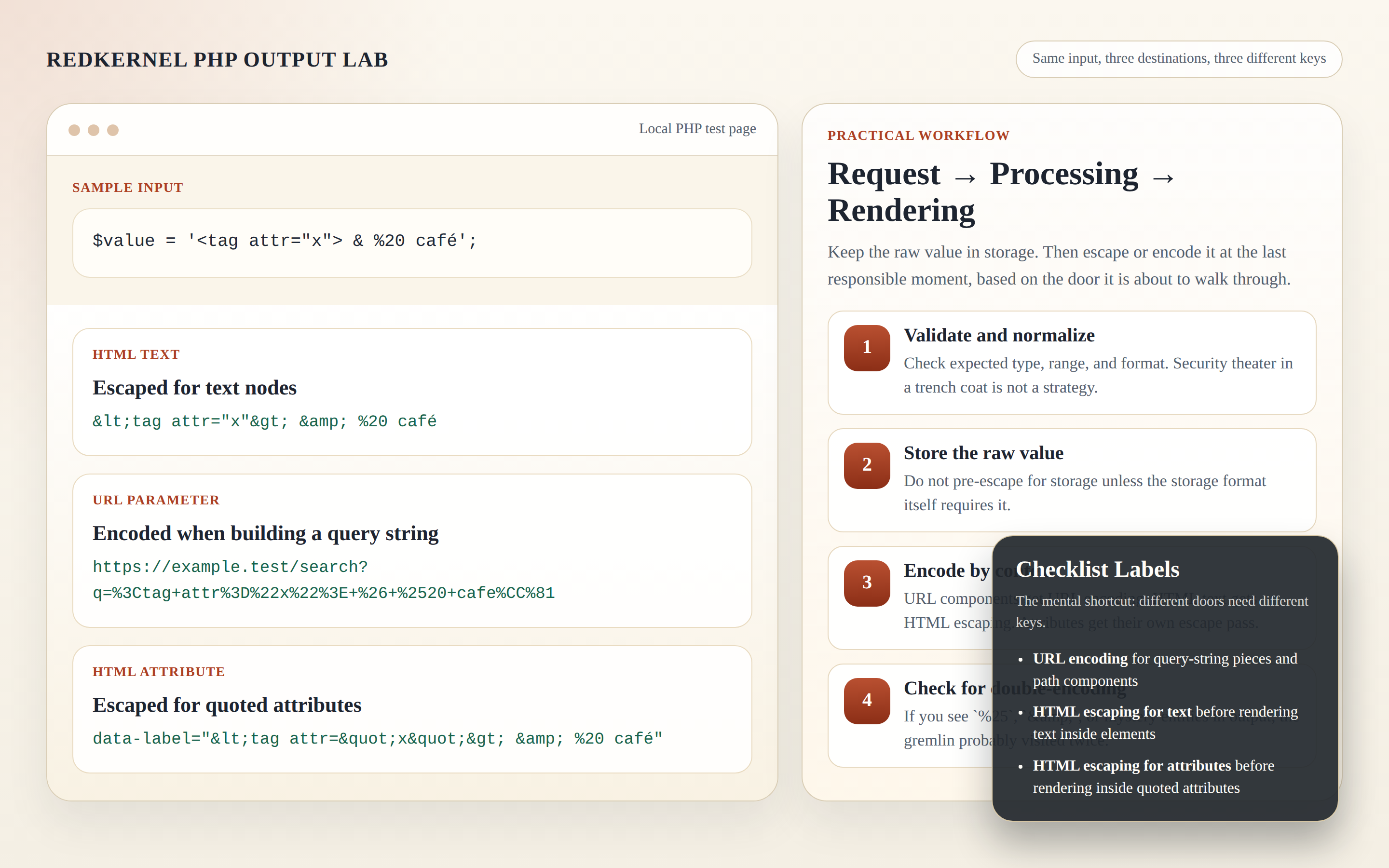
If you need a small utility page to inspect or test these steps, check FREEWARES before you write another throwaway script. If the result still looks wrong, Support is where the failure belongs.
Testing mini-scenarios you can run locally
Test with values that usually cause trouble. A calm test input often hides the bug; a messy one exposes it immediately.
- Spaces:
blue sky - Special characters:
a&b?c=d - Unicode: a real non-Latin string your app supports
- Repeated parameters: two values with the same key
- Literal plus signs: values where
+must stay a plus - Nested URLs: a full URL stored inside a query parameter
For each case, verify the same sequence: raw input, normalized value, encoded URL, escaped HTML output, and stored record. Repeated parameters are a good stress test because they show whether the structure stays consistent or gets improvised by hand.
Common failure modes and fixes
| Failure mode | What it looks like | Fix |
|---|---|---|
| Double encoding | %2520 shows up where %20 should be |
Store raw or normalized text and encode only at the final boundary |
| Wrong layer | HTML entities appear inside a URL or query string | Use URL encoding for URLs and HTML escaping for HTML |
| Display text in storage | Reports cannot recover the original value cleanly | Store the clean value, not the rendered one |
| Logging too much | Logs grow into a copy of the request body | Log the event, not every byte of the payload |
| Encryption confusion | Teams encrypt values that only needed encoding | Use encryption only for confidentiality, not for formatting |
One last practical note: if a link looks correct in a PHP string but breaks in a browser, inspect the final output, not the source variable. The browser only sees the last boundary. That is usually where the mistake lives. If you need a clean place to start over, the Sources & Functions section is the right baseline, and the home page remains the simplest way back to a known path.
Conclusion
A clean PHP workflow is not complicated. It is disciplined. Capture the source, normalize the value, encode only for the boundary you are crossing, store the clean record, and log just enough to make the next investigation easier.
That is the whole job. When the job stays small and the contract stays clear, you stop breaking links, you stop polluting logs, and you stop pretending one function can do every transformation at once. It cannot. That is how systems get noisy.
If you want a practical next step, review your current source-to-report path, verify one round trip with special characters, and decide exactly where each transformation belongs before the next change lands.