Most encoding bugs are not mysteries. They are mismatched destinations. If a Whois result looks wrong, a query string breaks, or HTML output shows the right characters in the wrong place, the browser is usually telling you exactly where the mistake happened.
When a developer sees garbled text, broken links, unexpected entities, or a Whois record that seems to disagree with reality, the useful question is not “What encoding should I use?” The useful question is “What will consume this string next?” That answer determines whether the right move is URL encoding, HTML escaping, entity decoding, or no transformation at all. PHP’s own manuals for urlencode(), rawurlencode(), and htmlspecialchars() are explicit about those differences, and RFC 3986 makes the URL grammar rules equally clear. The browser will not reward optimism.
By Lena Ortiz · Updated
This flow is meant for PHP developers who need a repeatable way to debug values that pass through lookup tools, request URLs, storage, logs, and rendered HTML. If you want the broader site context, start with the homepage. If the issue turns into a support problem, the Support page is the right next stop. For utility pages and related workflow notes, the FREEWARES, Sources/Functions…, Reports & Tracking, and RedKernel Referer Tracker sections sit in the same practical neighborhood.
When the output looks “wrong”
The fastest way to waste time is to treat every symptom as the same bug. They are not the same bug. They only look related because they all arrive wearing punctuation.
| Symptom | What it usually means | First check |
|---|---|---|
| Garbled characters | Character encoding mismatch, wrong source charset, or a value decoded too early | Confirm UTF-8 end to end before you touch escaping |
| Broken URLs | A path segment or query string was encoded with the wrong function, or encoded twice | Check whether the value is a whole URL, a path segment, or a single parameter |
| Unexpected entities | HTML entity encoding was applied too early, or output was escaped again on render | Search for &, <, or other double-encoded fragments |
| Mismatched Whois results | Raw registry text is being displayed as if it were structured or trusted HTML | Render Whois output as plain text, then normalize line breaks and labels |
A practical rule: if the value is correct in logs but wrong in the browser, the bug is probably in the output context. If the value is wrong in logs, the bug is earlier in the path. If the value is wrong in your head, the day is younger than the code.
Step 1: Identify the data’s path
Every value has a route. The route matters more than the value itself. A domain lookup, form submission, or query string can be perfectly valid at one stage and invalid at the next stage if you apply the wrong transformation too soon.
Trace the path in four steps:
- Input source – browser form field, Whois response, API payload, database row, or log line.
- PHP processing – parsing, validation, normalization, decoding, and any helper functions.
- Storage or logs – what gets persisted, what gets debugged, and whether the raw value is still intact.
- Output location – HTML body, HTML attribute, JavaScript string, URL parameter, email template, or plain text report.
That last step is where many debugging stories collapse. A string that is safe in a database is not automatically safe in HTML. A string that works inside a URL parameter is not automatically correct inside a visible sentence. A Whois response that looks readable in a terminal is not automatically safe to paste into a page.
If you are building reporting or tracking tools, the same discipline helps there too. The reporting layer should show the normalized value, but it should never overwrite the raw source. That is why pages such as Reports & Tracking and RedKernel Referer Tracker are useful mental models: capture first, normalize second, display last.
Step 2: Confirm whether you need encoding or decoding
Encoding and decoding are not opposite moral philosophies. They are just different operations with different destinations. The mistake is not that developers use them. The mistake is that they use them without naming the context.
Use this checklist:
| Destination | Usually need | Typical PHP helper | Notes |
|---|---|---|---|
| URL query parameter | Percent-encoding | urlencode() or rawurlencode() | Encode the parameter value, not the whole URL |
| HTML body text | HTML escaping | htmlspecialchars() | Use this for visible text nodes |
| HTML attribute value | HTML escaping with quotes handled | htmlspecialchars() | Use ENT_QUOTES and a known charset |
| Stored entity text that should become plain text again | Decoding | html_entity_decode() | Decode once, and only when the source is genuinely entity-encoded |
In plain terms: URL encoding is for URLs, HTML escaping is for HTML, and entity decoding is for legacy text that already contains entities. If the value is going to live in storage for later use, keep the raw form as the source of truth and transform only at the edge where it is rendered.
For URL grammar, RFC 3986 is the reference most people mean when they say “the URL should behave like a URL.” It is not exciting reading, but then neither is a broken link, and the latter usually takes longer to fix.
A short decision tree when you are stuck
When a bug is unclear, reduce it to three questions. The answer is often obvious once the context is named.
- What is the destination? If it is a URL, use URL encoding. If it is HTML, use HTML escaping. If it is a plain-text log, keep it plain text.
- Has the value already been transformed? If the string already contains entities or percent escapes, do not apply the same layer again just because the result looks “more secure.”
- Where did the value first become wrong? Compare the raw input, the storage value, the log value, and the rendered value. The first mismatch marks the layer to inspect.
| Question | Yes | No |
|---|---|---|
| Does the browser need to interpret the value as part of a URL? | Encode the parameter or path segment for that URL | Move on to the output context |
| Does the browser need to display the value as text? | Escape it for HTML | It may belong in storage, not output |
| Does the value already look escaped or encoded? | Find the earlier layer and stop duplicating the transformation | Apply the correct transformation once |
This tree is deliberately simple. That is the point. When you are under pressure, complicated rules become excuses for guessing. A short decision path gives you something better: a controlled way to be wrong less often.
Step 3: Verify with small, isolated test cases
The safest debug method is to remove everything that is not the bug. One parameter. One output context. One known sample string. If the bug disappears, the issue was probably hidden in another layer.
Try a sample value with characters that expose mistakes quickly: café & tea or name=ada?x=1. Then run each transformation separately.
$raw = 'café & tea';
$query = '/search?q=' . rawurlencode( $raw );
$body  = htmlspecialchars( $raw, ENT_QUOTES | ENT_SUBSTITUTE, 'UTF-8' );
$attr  = htmlspecialchars( $raw, ENT_QUOTES | ENT_SUBSTITUTE, 'UTF-8' );
Expected output patterns:
- Query string – reserved characters become percent-encoded so the browser can send them safely.
- HTML body – ampersands, angle brackets, and quotes become text, not markup.
- HTML attribute – quoted attributes stay readable and do not break the tag.
If those tiny tests behave correctly, the remaining bug is probably a sequencing problem. In other words, some other part of the application is altering the value before the final render step. A boring answer, but an efficient one.
Step 4: Avoid double-encoding
Double-encoding is what happens when a value is transformed twice for the same destination. It is one of the few bugs that can make correct data look suspicious and suspicious data look correct. A value like & is often a clue, not a solution.
Common ways it happens:
- You encode on input and again on output.
- You store HTML entities in the database, then escape them again in the template.
- You call a URL helper on a value that already contains percent escapes.
- You decode for display, then feed the decoded string back into storage.
Quick checks help more than debate:
- Search for
%25where you expected a literal percent sign; that often means a percent-encoded value was encoded again. - Search for
&and<; those usually point to double HTML escaping. - Compare the raw input length with the stored value length. A surprising increase is often a clue.
- Log the value before and after each transformation, but keep the logs plain text and contextual.
As a discipline, encode once at the last responsible moment. If a string is already encoded for the destination, leave it alone. The browser will not award points for enthusiasm.
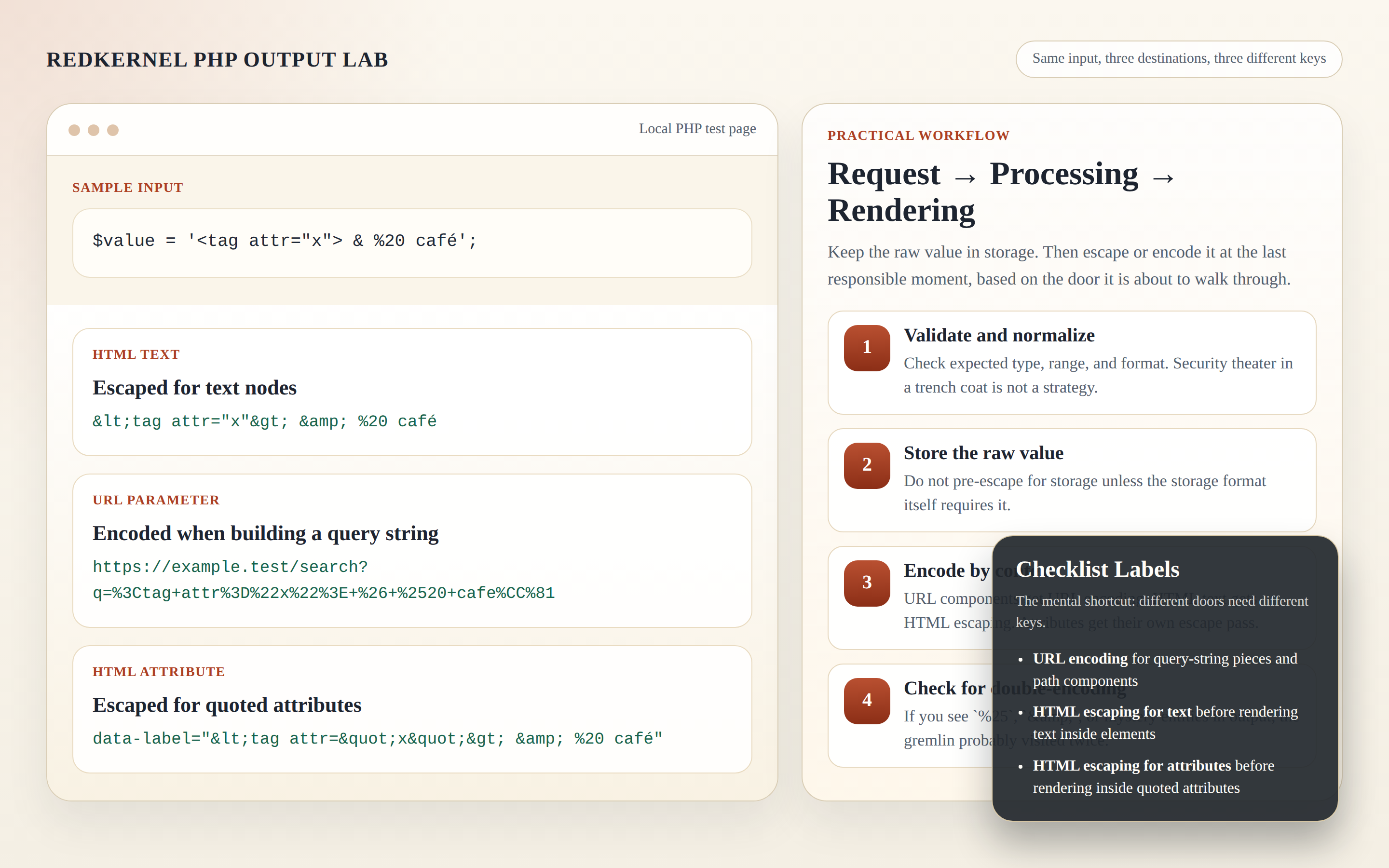
One sample value can be correct in storage and still fail when it reaches a different output context.
Step 5: Safe output by context
This is the part that saves time later. The same text can require a different treatment depending on where it lands. That is not inconsistency. That is the point.
| Context | Safe default | Why |
|---|---|---|
| HTML body | htmlspecialchars() |
Prevents markup from being interpreted as HTML |
| HTML attribute | htmlspecialchars() with quotes handled |
Prevents attribute breakage and quote confusion |
| URL parameter value | rawurlencode() or urlencode(), depending on the format expected |
Preserves reserved characters as data instead of syntax |
| Plain text log | No HTML escaping needed, but do sanitize the log format | Logs should be readable and stable, not clickable markup |
One useful habit is to keep the raw value in a variable named $raw or $source and create separate variables for each destination. That makes accidental reuse less likely. It also makes code review less like archaeology.
For PHP developers working in WordPress, the same logic applies with the platform helpers: esc_html() for text, esc_attr() for attributes, and esc_url() for URLs. These are not fancy functions. They are the fence line.
If you want a related overview of how small utility workflows fit together, the Sources/Functions… area is a reasonable place to keep developer-facing references close at hand.
Step 6: Whois result handling
Whois output deserves a little humility. It is often a mix of structured fields, free-form text, privacy redaction, referral messages, and registry-specific formatting. Treat it as untrusted text first and as useful information second.
That means three things:
- Do not render raw Whois lines as HTML unless they have been escaped.
- Preserve readability by keeping labels, line breaks, and spacing intact after escaping.
- Do not infer ownership from masked fields. Privacy-protected data is not a bug in the record; it is the record.
A practical display pattern is to normalize line endings, escape the whole block, and then present it in a text-friendly container. If you need a compact summary, extract the fields you trust into a table and keep the raw record in a collapsible section or a debug panel.
Use the attachment below as the mental model: the result is useful only because it is clearly labeled and not pretending to be more certain than it is.
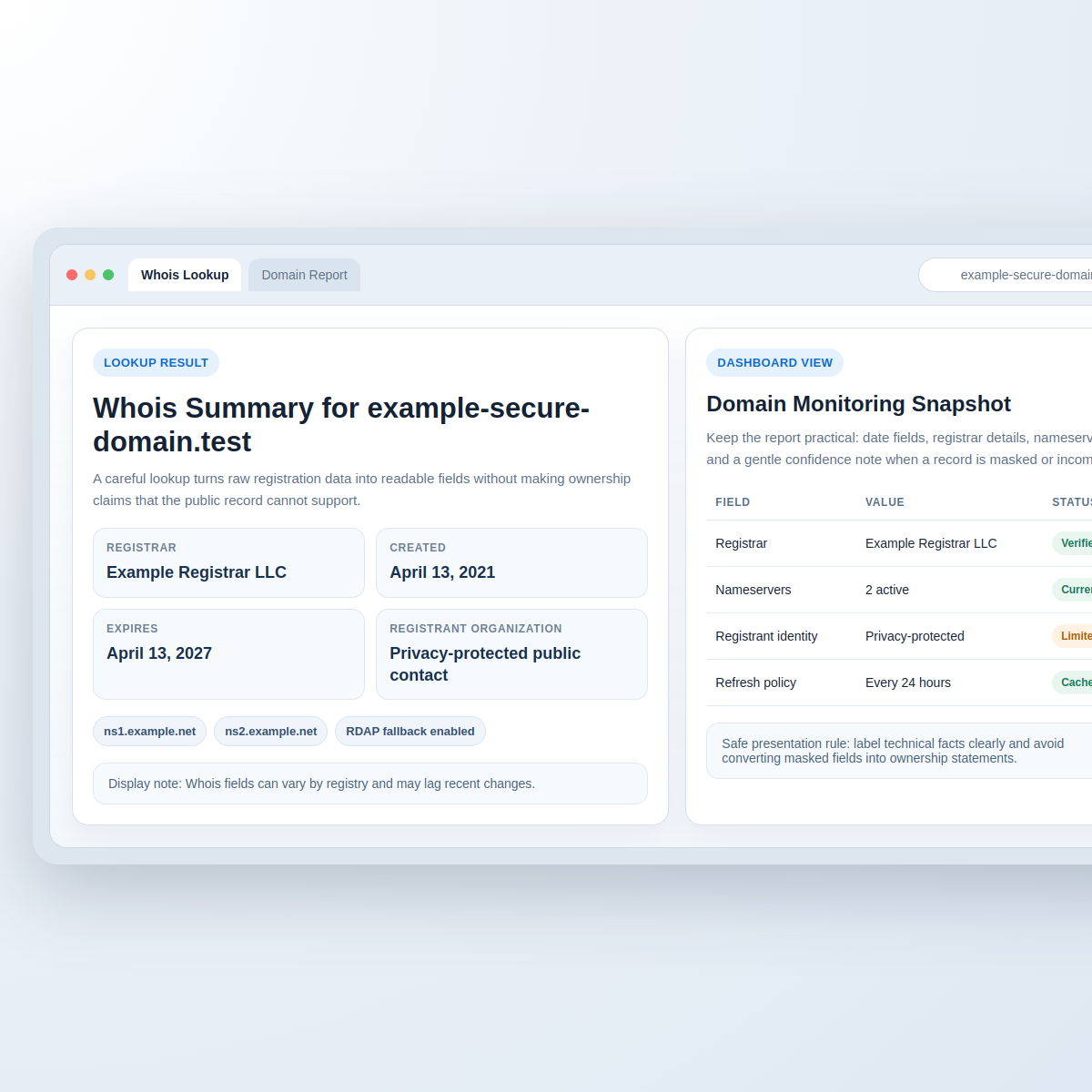
Whois data should be displayed as readable text, with privacy and uncertainty labeled clearly.
That is also why Reports & Tracking style pages are helpful. They encourage the same discipline: show the source, normalize the display, and keep the raw record available when someone needs to audit the path later.
Common mistakes and quick fixes
If you are debugging quickly, this is the part worth printing in your head.
| Mistake | What you see | Quick fix |
|---|---|---|
| Double-encoding | %25, &, or text that looks over-sanitized |
Remove one transformation step and encode only at the output boundary |
| Decoding too early | Text seems fine in one place and broken later | Keep the raw source in storage and decode only for the specific destination if needed |
| Mixing entity types | Entities appear in URLs or percent escapes appear in HTML text | Match the helper function to the destination context |
| Logging unescaped data | Logs become unreadable or misleading | Log plain text, add labels, and keep the raw value separate from the formatted view |
There is a simple decision rule here. If the string is being prepared for a browser URL, use URL encoding. If it is being printed inside HTML, use HTML escaping. If it is being displayed as Whois text, escape it and keep its line breaks under control. If you are tempted to “just fix it in the view,” that sentence usually means the wrong layer is about to carry the blame.
Mini debug worksheet you can copy into your notes
This worksheet is intentionally plain. It is meant to help you isolate where a value changed and whether that change was expected.
| Field | Write it down |
|---|---|
| Input value | |
| Source | Form, API, Whois, database, or log |
| Character set | |
| Transformation 1 | |
| Transformation 2 | |
| Output context | HTML body, attribute, URL parameter, plain text, or JSON |
| Expected output | |
| Actual output | |
| First mismatch found at | |
| Next check |
If you want a filled example, use one row for a query string value, one row for HTML text, and one row for Whois output. That gives you enough contrast to see whether the issue is in encoding, decoding, storage, or render logic.
Two examples that surface fast
Some values expose mistakes immediately because they contain both safe and unsafe characters. That makes them useful test cases, not annoying ones.
- Search terms with spaces and accents –
café & teashould become a safe query parameter with percent escapes, while still showing readable text in the page body. - Whois records with privacy labels –
Registrant Organization: Privacy-protected public contactshould remain visible as text, but not be treated as proof of ownership or as HTML markup.
If those two cases behave correctly, many of the usual problems fall away. The remaining issues are then more likely to be context bugs, bad assumptions about where the string came from, or a template that is escaping something that was already escaped upstream. That is a smaller, more manageable list, which is usually what you want from a debug session.
Practical conclusion
When output looks wrong, do not start by guessing the library. Start by naming the destination. That one decision usually tells you whether you need URL encoding, HTML escaping, entity decoding, or no transformation at all.
The safest default is straightforward: keep the raw data raw, transform it only when the destination requires it, and verify the behavior in a tiny test case before you trust the larger workflow. For utility references and neighboring workflow pages, FREEWARES and Support are sensible follow-ups. If you are building a broader workflow around lookup, logs, and reporting, the RedKernel Referer Tracker and Reports & Tracking pages sit in the same operational lane.
Key point: encode for the door the value is about to walk through. If the value is leaving PHP for a URL, encode it as a URL. If it is leaving PHP for HTML, escape it as HTML. If it is leaving Whois as text, treat it as text. The rule is dull, which is why it works.