If you only keep one rule from this guide, keep this one: use online tools to validate the idea, and use PHP to ship the behavior.
When I sit down with a messy workflow note, I usually see the same four questions hiding inside it: Is this a URL problem or an HTML problem? Do I need to validate the output before I write code? Will this value ever need to come back later? And am I about to log too much? As Edsger Dijkstra put it, “Simplicity is prerequisite for reliability.” That is the mood here. The hard part is not finding a tool; it is choosing the right layer.
The reason this matters is simple: the PHP manual has very specific guidance for functions like rawurlencode() and htmlspecialchars(), while OWASP keeps reminding developers that logging and cryptographic storage are not places for casual guesses. Those two ideas meet in day-to-day work more often than people expect. If you want the original text-safe behavior without guessing, it is worth checking the official rules first.
In this article, I will show you how I decide between a browser tool and a PHP function for encoding, encryption, and tracking tasks. I will also show you the mistakes that quietly break links, leak data, or make reports less trustworthy than they look. If you want a broader site map while you read, start at the home page, keep Support open for follow-up questions, and use Sources/Functions… plus Reports & Tracking as companion pages when you want to connect this guide to the rest of the site.
For the part of the workflow that touches traffic sources, the RedKernel Referer Tracker page is the right place to start. And if you like small utilities that shorten repetitive setup work, the FREEWARES page keeps those options in one place.
Quick context: why I use both tools and PHP
I keep a simple working rule. Online tools are for checking ideas, PHP is for enforcing behavior. That sounds obvious until a deadline shows up and the same sample string gets pasted into five different places. Then the distinction gets blurry fast.
Here is the practical version:
- Use a tool when you want a fast sanity check, a visible before/after comparison, or a quick answer while debugging.
- Use PHP when the behavior has to be repeatable, testable, and safe in production.
- Use logs and reports when you need trends, counts, or troubleshooting notes that do not require the original secret value.
This is also where a small internal utility starts to make sense. If the same checks keep coming up, a neutral web app generator can help a team prototype a tiny validation dashboard instead of rebuilding the same helper screens by hand every time. That is not a magic fix. It is just a faster way to turn a recurring workflow into something predictable.
Choose the right layer: debugging, production, reporting
The cleanest way to decide is to ask what stage you are in. I use three buckets because they keep me honest.
| Layer | Best for | What you should verify | What you should avoid |
|---|---|---|---|
| Debugging tools | Quick checks, visible transformations, comparison of input and output | Does the output look correct for this exact sample? | Pasting secrets, testing with live customer data, assuming the tool is the final implementation |
| PHP production code | Repeatable encoding, escaping, encryption, and logging rules | Does the code behave the same way for every request? | Leaving context-sensitive decisions to memory or manual cleanup |
| Reporting and logs | Counts, trends, troubleshooting, and lightweight auditing | Are the fields limited, normalized, and non-sensitive? | Storing raw secrets, raw query strings, or personal data you do not need |
That last row matters more than people admit. Reporting is where over-collection becomes a habit. A log field feels harmless until it contains a token, a password reset link, or a full referrer URL with a query string you never meant to keep.
When the reporting side starts to grow, I like to keep the Reports & Tracking page close by so the implementation stays tied to a simple visitor-facing explanation. That makes the code easier to defend and the data easier to explain later.
Terminology: the words that keep tripping people up
Before I choose a function or a tool, I define the terms in plain English. This saves time later, because the same word can mean different things in different contexts.
| Term | Plain meaning | Typical use |
|---|---|---|
| URL encoding | Changing characters so they are safe inside a URL component | Query strings, form targets, path fragments |
| HTML entity encoding | Replacing special characters so HTML displays them as text instead of markup | Paragraphs, titles, attributes, labels |
| Escaping | Making text safe for a specific output context | HTML, attributes, URLs, JSON, shell commands |
| Hashing | Turning input into a fixed fingerprint you cannot reasonably reverse | Integrity checks, comparisons, digests |
| Encryption | Protecting data so trusted code can decrypt it later | Secrets and confidential values that must be recovered later |
| Referrer | The source page a visitor came from, if the browser sends it | Traffic reports, landing-page analysis, source attribution |
The useful mental shortcut is this: encoding changes representation, hashing changes identity, encryption changes accessibility. If you remember nothing else, remember that. It stops a lot of accidental misuse before it starts.
Encoding tasks: URL encoding and HTML entities
Encoding is the place where people move too fast. It looks trivial, but the output has to match the context exactly. The right transformation for a URL is not the right transformation for HTML text, and neither one is the right transformation for a password or a private token.
Use a tool when you need to see the shape of the problem
When I am debugging a string, I often start with a browser tool because I want to see the result before I touch the code. That helps me answer questions like: Did the ampersand get escaped? Did the space become a plus sign or `%20`? Did a quote stay visible or turn into an entity? The point is not to trust the tool blindly. The point is to build a test case I can carry into PHP.
A good cross-check is to compare the tool output with the PHP manual for rawurlencode() and htmlspecialchars(). Those two functions cover most of the practical output cases I run into when a query string or a page fragment needs to be safe and readable.
Use PHP when the output has to survive real traffic
In production code, I want the result to be boring. Boring is good. Boring means the same input always follows the same rule, no matter who uses the page or which browser sends the request.
$term = $_GET['q'] ?? '';

// Build a URL parameter safely.
$searchUrl = 'https://example.com/search?q=' . rawurlencode($term);

// Render a display string safely.
$safeText = htmlspecialchars($term, ENT_QUOTES | ENT_SUBSTITUTE, 'UTF-8');
The main thing I verify is not just whether the string looks different. I check where it will be used. A string can be safe in HTML text and still be wrong in a URL. It can be safe in a URL and still break an HTML attribute. Context is the whole game.
What I test before I trust the output
- Spaces, plus signs, slashes, and ampersands.
- Quotes, apostrophes, and angle brackets.
- Multibyte characters such as accented letters.
- Repeated encoding, because double-encoding is a common mistake.
- Whether the output is meant for a URL component, HTML text, or an attribute.
If a string already came from an encoded source, I stop and check before I encode it again. Double-encoding is one of those bugs that looks like “extra safety” on day one and like a support ticket on day two.
Encryption tasks: when you truly need it, and when you do not
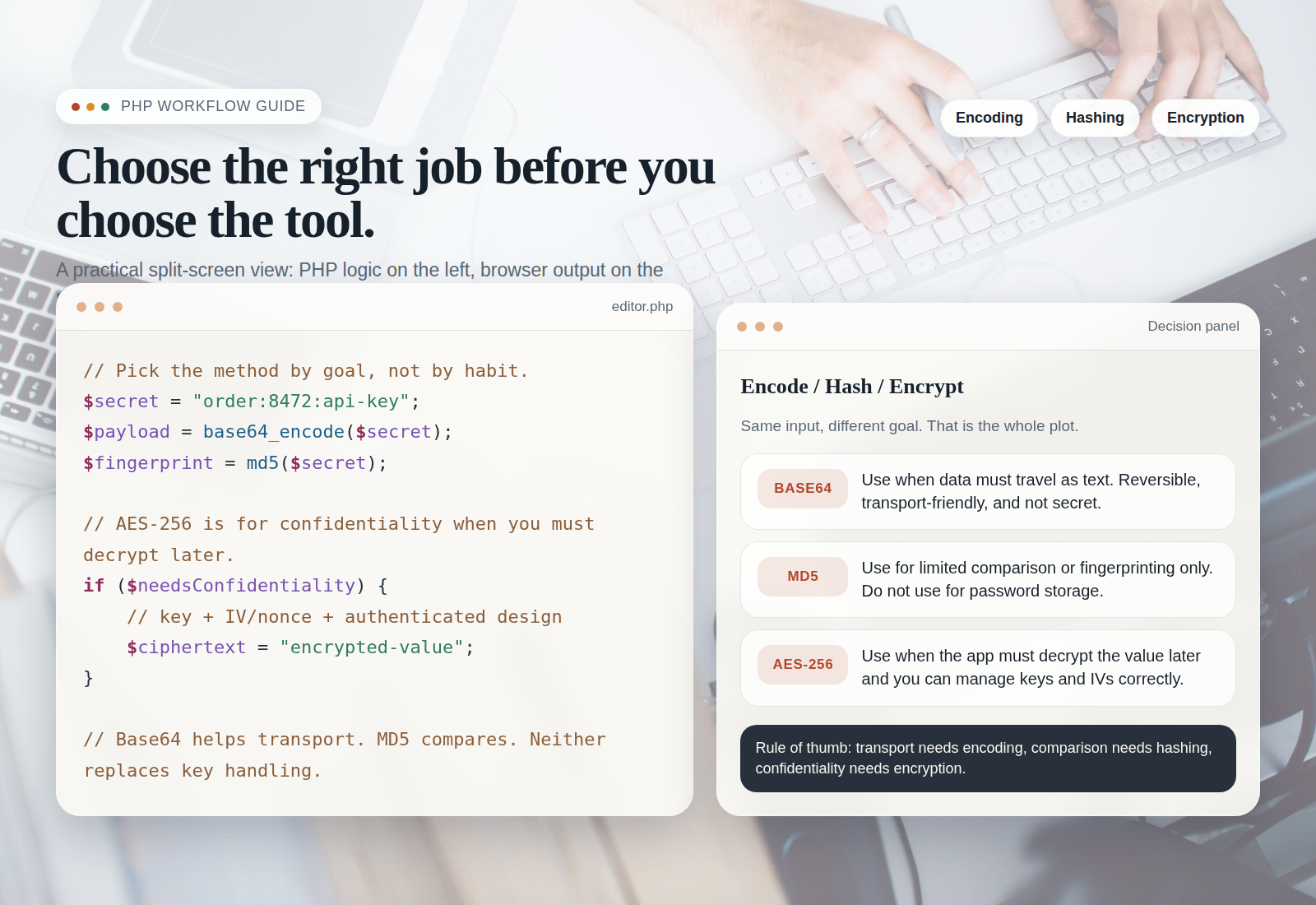
This is where the decision becomes less about syntax and more about intent. If you need to recover the original value later, encryption is on the table. If you only need to compare a value or check that it has not changed, hashing is usually the better category. If you only need text to survive transport, encoding is enough.
That means the first question is not “Which algorithm sounds strongest?” It is “What problem am I solving?” That question saves a lot of unnecessary complexity.
For the surrounding safety habits, I keep OWASP’s Cryptographic Storage Cheat Sheet open when the topic moves from encoding into encryption. For PHP-specific implementation details, the manual pages for hash_hmac() and openssl_encrypt() are the starting point I trust before I build anything custom.
Here is the practical rule I use:
- Use encryption when the value must come back in readable form later and the audience is limited to trusted code.
- Use hashing when you only need a fingerprint or comparison value.
- Use encoding when the data is still the same data, but it needs to travel through a different text context safely.
That also means I do not hide secrets in URLs and then call the job done. Query strings are visible in browser history, server logs, analytics systems, and copied links. If the value is sensitive, it belongs somewhere else.
Put another way: if the data would embarrass you in a screenshot, do not make a URL the storage layer. There is no elegance in that trick. Only cleanup.
Tracking tasks: designing referrer capture without over-collecting
Tracking is useful when it helps you answer a small operational question: where did this visitor come from, which page did they land on, and what should I do next? It becomes a problem when the implementation starts collecting everything just because it can.
I like to keep tracking narrow. For normal reporting, I generally want:
- the landing page,
- the referrer host, if available,
- a normalized referrer path,
- a timestamp,
- and a count or session bucket.
That is enough for most practical reports. It is also a lot easier to explain. If you want a deeper walkthrough of the concept, the RedKernel Referer Tracker page and the broader Reports & Tracking section show how the site organizes that kind of information.
For logging discipline, I lean on OWASP’s Logging Cheat Sheet because it reminds me that logs are not a dumping ground. They are a narrow tool with a purpose. That is especially important if the referrer includes query strings, personal data, or anything that should not be stored by default.
A safer capture pattern
$rawReferrer = $_SERVER['HTTP_REFERER'] ?? '';

if ($rawReferrer !== '') {
    $parts = parse_url($rawReferrer);

    $host = $parts['host'] ?? '';
    $path = $parts['path'] ?? '';

    // Keep only what the report needs.
    $referrerSummary = trim($host . $path, '/');
    // Store the summary, not the full raw URL, unless you truly need more detail.
}
I am careful here. This is not a privacy loophole. It is the opposite. If I do not need the query string, I do not store it. If I do not need a visitor identifier, I do not invent one. A report is only as good as the data policy behind it.
What not to collect by default
- Full query strings from referrers.
- Personal data that can be avoided.
- Authentication tokens or session values.
- Raw form submissions when a summary will do.
- Anything that would make the report harder to defend if a user asked why it was stored.
If your reporting needs start to feel more like a dashboard project, that is often the moment to sketch the workflow in a small app rather than patching together more manual steps. A lightweight internal screen is easier to keep consistent than a spreadsheet with six half-frozen tabs and one note that says “do not touch.”
A safe test-first workflow
When I work through a new encoding or tracking task, I try to make the test come first. That way I know what “correct” looks like before I write the PHP version. It also keeps the browser tool in the right place: useful, but not authoritative.
- Build a small input set. Use a few strings that include spaces, quotes, slashes, ampersands, and one or two non-ASCII characters.
- Run the tool check. Confirm the output shape for the exact context you care about: URL, HTML text, HTML attribute, or report field.
- Implement the PHP function. Match the function to the context instead of forcing a one-size-fits-all helper into everything.
- Add unit tests. Test both normal values and awkward edge cases so you can spot double-encoding or accidental truncation early.
- Review logs and reports. Make sure the data you keep is the data you actually need, and nothing more.
One practical thing I always do is write the test cases in plain language first:
| Sample input | What I am checking | Expected result |
|---|---|---|
a & b |
HTML display and attribute safety | The ampersand should be displayed, not interpreted as markup |
hello world |
URL encoding of a query value | The space should become a URL-safe separator |
O'Reilly |
Quote handling in HTML | The apostrophe should not break the output context |
Café |
Character handling | The accent should survive the round trip in UTF-8 |
Common failure modes
The same mistakes keep showing up, which is good news in a way. Repeated mistakes are easier to test for than random ones.
| Failure mode | What it looks like | What usually fixes it |
|---|---|---|
| Double-encoding | Percent signs or entities appear twice, or the output looks strangely escaped | Encode once at the correct layer and stop re-processing already encoded data |
| Inconsistent normalization | The same value reports differently in different places | Normalize before storing or comparing, and keep the rule consistent |
| Leaking raw input into HTML | User content appears to break the page or render unexpectedly | Escape for the output context before rendering |
| Storing secrets in URLs | A token or private value shows up in history, analytics, or logs | Move the secret out of the URL and into a safer storage or transport path |
| Over-collecting referrers | Logs are full of fields nobody uses | Store a trimmed summary and keep the report narrow |
The hard part is not the code. The hard part is knowing which layer gets the last word. Once you know that, the rest becomes much calmer.
Mini checklist before shipping
Before I call a workflow ready, I run a quick checklist. It is small on purpose.
- Correctness: the output matches the target context.
- Safety: secrets are not leaking into URLs, HTML, or logs.
- Privacy: only the fields needed for the report are stored.
- Maintainability: the function choice is obvious to the next person who reads the code.
- Test coverage: the awkward edge cases are covered, not just the happy path.
- Support path: there is a clear place to ask for help if the workflow changes later.
If one of those items is weak, I do not ship and hope for the best. I tighten the rule first. That is usually less work than explaining a broken report later.
Rule of thumb: tool for validation, PHP for production
| Question | Use a tool | Use PHP | Use logs/reporting |
|---|---|---|---|
| Do I need to see what this string becomes? | Yes | Then make the same rule permanent | No |
| Do I need the behavior to repeat on every request? | Only for checking | Yes | No |
| Do I need to store a summary, not the full raw value? | Sometimes | Yes, with validation and normalization | Yes |
| Do I need to protect a secret that must be recovered later? | No | Yes | No |
That table is the whole point of the workflow. Validate with a tool. Enforce with PHP. Report only what you need. Everything else is detail.
If you want a quick next step after reading, I would do three things: check the Sources/Functions… page for helper references, review Reports & Tracking if you are touching analytics data, and use Support if the workflow needs a second pair of eyes.
Simple rule, short version: use online tools to confirm the shape of the problem, use PHP to lock in the correct behavior, and use logs only for non-sensitive reporting that you can actually justify later. That is the version that keeps a developer calm at 4:55 p.m., which is when the tricky bugs tend to remember your name.