Lightweight tracking is not the same as weak tracking. The useful version is narrower: capture only what answers a real question, store it in a form you can defend, and let the rest pass by without turning your log table into a liability.
Developers usually arrive at this topic with a cluster of practical questions. What should a source or referrer log actually record? How much raw URL data is too much? How do you keep reports useful without storing sensitive parameters forever? And how do you stop a small tracking feature from expanding into a privacy problem with charts? Those are good questions because they force the design to start with purpose rather than collection.
There is solid reason to be careful here. The MDN reference for the HTTP Referer header makes it plain that the header is optional, shaped by browser behavior, and not a complete reconstruction of user intent. Meanwhile, the OWASP Logging Cheat Sheet is a useful reminder that logs are security-relevant data stores, not harmless buckets for “everything just in case.” Context matters before code does.
This guide takes the narrower path on purpose. It shows how to define lightweight tracking, choose goals, capture safe fields, normalize values into stable report keys, and review the results without overengineering. For readers navigating adjacent tools, the home page collects the main site sections, the Reports & Tracking page covers related workflows, and the RedKernel Referer Tracker page stays close to the tracker-specific side of the topic.

Key terms before the design work starts
A few definitions keep the rest of the article from drifting.
- Referrer: the previous page reported through the HTTP
Refererrequest header, when the browser sends it. - Source log: a structured record describing where a visit or request appears to have come from.
- Landing page: the first page on your site tied to the event you decided to count.
- Normalization: turning messy raw values into stable grouping keys so reports do not split the same source into ten variants.
- Retention: how long raw or aggregated tracking data remains available before deletion or roll-up.
That distinction between raw data and report keys matters. Raw inputs are what the server observed. Report keys are the cleaned values you actually aggregate. Good tracking systems separate those two things early.
What “lightweight tracking” should mean
When I say lightweight tracking, I mean a design with three limits built in from the start: minimal fields, short retention, and a clearly stated purpose. The goal is not to collect less for the sake of ideology. The goal is to collect enough to answer the question you care about without creating a second problem that needs its own policy meeting.
A lightweight referrer log usually answers one or more narrow questions:
- Which external sources are sending traffic to a specific landing page?
- Did a campaign or documentation link start generating visits?
- Did an unexpected source spike happen that deserves review?
- Is a redirect, self-referral, or bot pattern polluting the report?
Notice what those questions do not require. They do not require a permanent copy of every full URL. They do not require personal identifiers by default. They do not require a dashboard filled with decorative metrics that nobody can explain two weeks later.
A practical lightweight design usually keeps:
- the time the event was observed,
- the normalized landing page key,
- the normalized source or referrer key,
- a small set of flags for quality control, and
- an aggregation or deduplication rule.
Everything else should earn its place. If a field does not support debugging, attribution, content review, or abuse detection, the useful takeaway is often to leave it out.
Decide your tracking goals before choosing fields
Most reporting mistakes start one step too late. Developers begin by storing whatever is easy to read from the request, then try to discover the purpose afterward. Reverse that order. Decide the goal first, then choose fields that support only that goal.
Goal 1: debugging
Debugging logs help answer questions like “why is this source missing?” or “why are self-referrals suddenly rising?” For debugging, you may need short-lived access to rawer values, but only for a tight retention window. The important boundary is that debugging data does not automatically deserve permanent storage or broad report visibility.
Useful fields for debugging often include raw header presence, parse status, normalization status, and a reason code such as blank, invalid_url, self_referral, or blocked_parameter.
Goal 2: attribution
Attribution asks which source delivered the visit to a landing page. This goal usually needs normalized host, normalized path, a small allow-list of campaign parameters if you truly use them, and a clearly defined event such as “first eligible landing-page pageview.” Attribution does not improve just because you saved more clutter.
Goal 3: content performance
Content performance reporting asks which pages receive visits from which external contexts. For this, grouped counts over time are usually more useful than raw request logs. Once the pattern is stable, aggregated daily rows may be more valuable than permanent event-by-event storage.
The design implication is straightforward:
| Tracking goal | What you need | What you should question |
|---|---|---|
| Debugging | Parse status, short-lived raw visibility, reason codes | Long retention for raw URLs |
| Attribution | Normalized source key, landing page key, time bucket | Keeping every parameter forever |
| Content performance | Grouped counts by page and source over time | Per-request detail once trends are stable |
If your goal list is still fuzzy, start with attribution plus quality checks. That combination usually gives small teams enough signal to be useful without creating an oversized data handling burden.
Data to capture safely
Referrer logging should begin with the assumption that request data is untrusted input. The OWASP Input Validation Cheat Sheet is worth keeping in mind here: validate structure, reject malformed values cleanly, and avoid clever recovery logic that turns junk into something that merely looks valid.
For many developer-friendly implementations, the safe baseline is:
- Timestamp: when the event was observed, preferably in UTC.
- Landing page path: the canonical path or route on your site.
- Referrer host: lowercased after successful parsing.
- Referrer path: optional, if it supports your reporting goal.
- Parameter subset: only an allow-listed set you intentionally report on.
- User agent summary or bot flag: optional, and often better as a derived label than a permanent full string.
- Processing flags: direct/unknown, self-referral, parse error, invalid scheme, or bot.
This is usually enough to produce useful reports. The part to avoid is just as important.
What to avoid storing by default
- email addresses embedded in query strings,
- session IDs, access tokens, reset tokens, or auth codes,
- full IP addresses when you do not have a clear operational need,
- full user-agent strings kept forever without a reason,
- fragments, because they are noisy and often irrelevant to server-side reporting,
- every raw parameter on the theory that you might someday want it.
Developers sometimes worry that dropping raw details will reduce future flexibility. That is true in a narrow sense. It is also the point. A smaller, more defensible dataset is often easier to reason about, easier to secure, and less awkward to justify later.
For teams turning this into an internal operations panel, a neutral third-party web app generator can reduce dashboard boilerplate, but it does not change the underlying rules about minimal fields, validation, retention, or safe display. Tooling can speed up implementation. It cannot decide what should never have been logged.
Normalization rules that keep reports readable
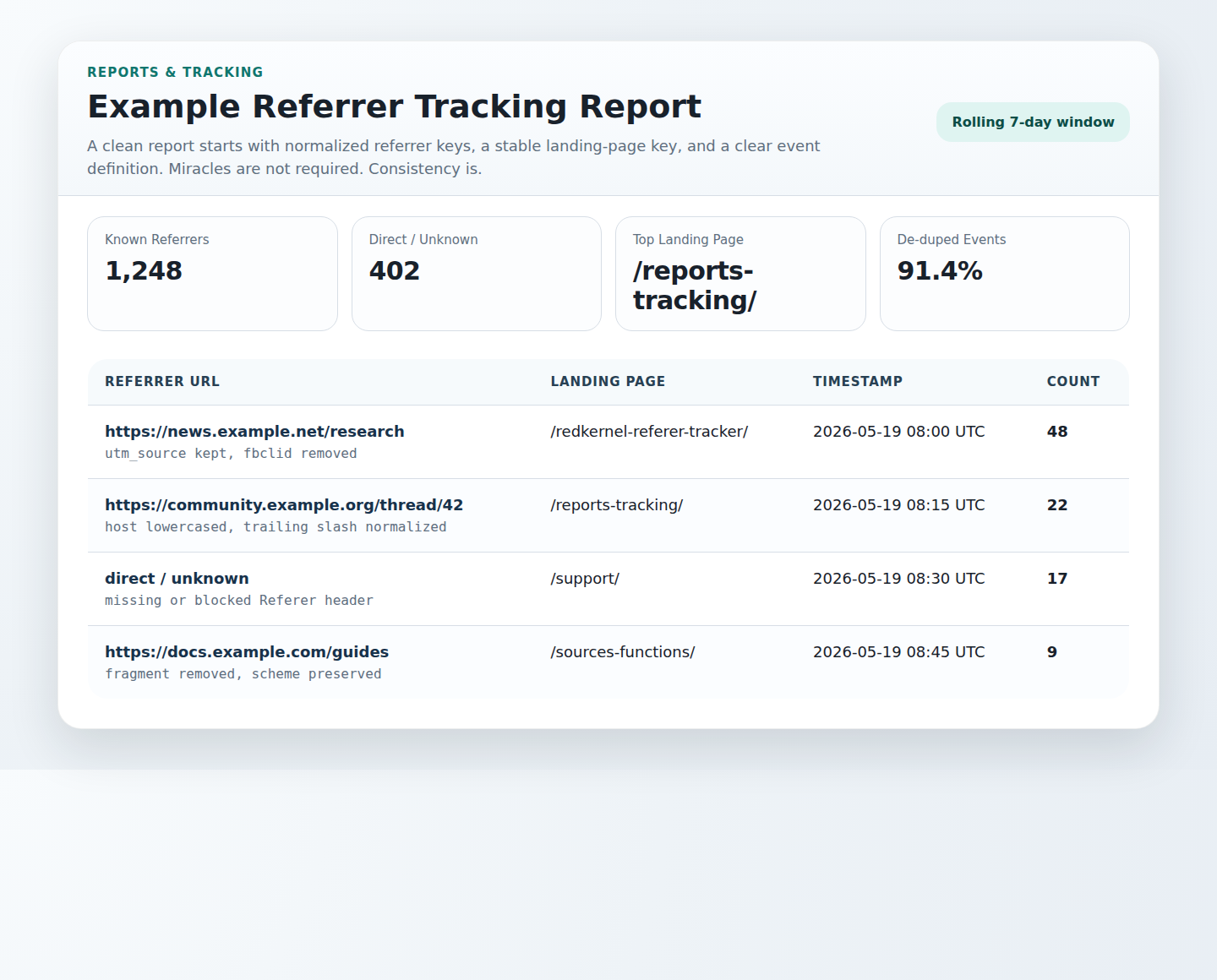
Normalization is where a referrer log becomes reportable instead of merely collectible. The same source should not appear as five rows because of capitalization, trailing slashes, or parameter noise. Decide the rules once, document them, and keep them stable over time.
A practical normalization sequence looks like this:
- Trim leading and trailing whitespace. Reject obviously malformed empty results.
- Enforce length limits. Very long values often deserve rejection or debug-only treatment.
- Parse the URL safely. If parsing fails, do not invent a valid structure from the wreckage.
- Lowercase the host. Hostname case should not split the same source into different buckets.
- Remove fragments. They rarely improve server-side source reporting.
- Apply path rules. Decide how to treat trailing slashes, index pages, and duplicate separators.
- Filter query parameters. Keep only an allow-listed subset that directly supports reporting.
- Handle blanks explicitly. Missing or blank referrers should map to a clear bucket such as
direct_unknown.
That final blank-handling rule matters more than it first appears. A missing referrer is not necessarily an error. It may reflect bookmarks, direct navigation, browser privacy behavior, or redirect behavior. Treating every missing value as broken data leads teams into unnecessary detective work.
Normalization also needs a few stable output conventions:
| Input issue | Recommended rule | Why it helps |
|---|---|---|
Example.com vs example.com |
Lowercase host | Avoid split counts for the same source |
| Trailing slash variation | Choose one canonical path form | Keeps reports stable over time |
| Query-string noise | Allow-list only useful parameters | Reduces clutter and privacy risk |
| Blank or blocked header | Map to direct_unknown |
Prevents false assumptions |
Storage and structure: a schema you can maintain
A lightweight system does not need an elaborate schema, but it does need a clear one. If multiple people on a team cannot tell the difference between raw input, normalized key, and reporting bucket, the design is already drifting.
A practical event-level schema can be as small as this:
| Field | Purpose | Notes |
|---|---|---|
event_time_utc |
When the event happened | Use one time standard consistently |
landing_path |
Canonical page receiving the visit | Normalize path rules |
referrer_host |
Main grouping key for source | Lowercase after parsing |
referrer_path |
Optional detail for attribution | Keep only if useful |
referrer_params_json |
Allow-listed parameter subset | Often empty, and that is fine |
source_bucket |
Human-readable grouping label | Examples: external, direct_unknown, self_referral |
ua_family |
Optional device/bot summary | Prefer summary over raw string when possible |
quality_flag |
Validation or review hint | Examples: ok, invalid_url, sensitive_param_removed |
dedupe_key |
Short-window duplicate control | Define this rule explicitly |
Many teams also benefit from a second, aggregated daily table. Event logs help debugging and review. Daily summaries help reporting. Separating those concerns makes retention easier because the detailed table can expire far sooner than the aggregate table.
Example log entries
The examples below show what “enough detail” can look like in practice.
{
  "event_time_utc": "2026-06-19T08:14:00Z",
  "landing_path": "/reports-tracking/",
  "referrer_host": "developer.mozilla.org",
  "referrer_path": "/en-US/docs/Web/HTTP/Reference/Headers/Referer",
  "referrer_params_json": {},
  "source_bucket": "external",
  "ua_family": "desktop_browser",
  "quality_flag": "ok",
  "dedupe_key": "2026-06-19T08:10Z|/reports-tracking/|developer.mozilla.org"
}
{
"event_time_utc": "2026-06-19T10:32:00Z",
"landing_path": "/redkernel-referer-tracker/",
"referrer_host": null,
"referrer_path": null,
"referrer_params_json": {},
"source_bucket": "direct_unknown",
"ua_family": "mobile_browser",
"quality_flag": "blank_header",
"dedupe_key": "2026-06-19T10:30Z|/redkernel-referer-tracker/|direct_unknown"
}Neither entry is dramatic. That is exactly what you want. Simple records are easier to validate, easier to explain, and easier to roll up into reports that people can actually trust.
Security checklist
Referrer logs are still software inputs and outputs. They can break parsing, poison reports, or create unsafe admin views if they are treated casually. A useful design review can be surprisingly short:
- Validate input format before storage. Accept only the URL shapes and schemes you intend to support.
- Cap field length. Do not let extremely long header values flow through every stage of the system.
- Prevent log injection. Strip or reject control characters that can corrupt line-based logs or exports.
- Escape on output. Raw log content should never render directly into an admin table, CSV preview, or HTML report.
- Separate debug data from report data. Raw values, if retained briefly, should not be what everyday dashboards display.
- Restrict access. Tracking tables and exports should be visible only to people who need them.
- Monitor failures. Invalid parse rates and sensitive-parameter removals are useful operational signals.
If you need a policy anchor for browser behavior as well, the MDN guide to Referrer-Policy is a practical reference for understanding how much source detail may be sent in the first place. That matters because your logging design should not assume the browser will always send a full upstream URL.
Privacy checklist
Privacy-aware design is less about grand language and more about specific restraints. What do you collect? Why? For how long? Who can see it? When does it disappear or roll up into aggregates? Those are the questions that keep a small tracking feature from becoming a quiet archive of more detail than anyone needed.
- State the purpose. Document whether the log supports debugging, attribution, content review, or abuse monitoring.
- Give notice where appropriate. Your public privacy and cookie materials should align with what the site actually logs.
- Minimize IP handling. If full IP storage is not necessary, prefer truncation, hashing with care, or avoiding long-term storage entirely.
- Drop sensitive parameters before persistence. It is easier to prevent collection than to secure unnecessary collection later.
- Set short retention for detailed records. Keep event-level data only as long as it serves the stated goal.
- Prefer aggregation for long-term trends. Daily summaries often carry the signal without the same exposure.
- Review access paths. Privacy risk is not only in storage; it is also in exports, dashboards, and shared screenshots.
If your current logging policy is informal, this is a good point to tighten it. The site’s Support page and Contact page are the natural next steps when a workflow needs review by someone beyond the immediate implementation.
Reporting workflow: from daily review to next action
Once the data model is narrow and consistent, reporting can stay refreshingly plain. You do not need a large analytics suite to review source quality. A few stable views are often enough.
1. Daily summary view
Start with a table that shows date, landing page, normalized source key, count, and quality flags. This is the operational view that catches obvious shifts quickly.
2. Anomaly checks
Review spikes in three buckets first:
- direct/unknown jumps,
- self-referral increases,
- new high-volume sources that were previously absent.
Those three checks usually reveal whether the change is a tracking issue, a traffic change, or a noise event from bots or redirects.
3. Next-step actions
Each anomaly should have a small decision tree attached to it:
- If direct/unknown rises sharply, inspect header presence rates and any recent browser or redirect changes.
- If self-referrals rise, review internal host filtering and redirect rules.
- If a new source appears, verify it is legitimate before celebrating or blocking it.
- If sensitive parameters are being stripped frequently, review upstream link generation or campaign tagging.
This is also where lightweight tooling helps. A simple dashboard or scheduled export can be enough. The useful workflow is not “collect more.” It is “review the same stable views consistently and act on the parts that need attention.”
Common failure modes and practical mitigations
Source and referrer logs fail in familiar ways. The good news is that most of them are manageable with boring rules.
Self-referrals
Self-referrals usually mean internal hosts were not filtered correctly, or event timing was defined too loosely around redirects. Mitigation: maintain a canonical list of internal hosts and route them into a dedicated bucket or exclude them from external-source rankings.
Bots and spam referrers
Some traffic is automated, some source values are junk, and some spam referrers exist only to get copied into dashboards and shared screenshots. Mitigation: maintain bot labels, block known junk patterns where reasonable, and keep suspicious domains out of top-source summaries until they are reviewed.
Parameter explosion
Reports become unreadable when every campaign variation or random parameter produces a separate source row. Mitigation: keep a short parameter allow-list and discard the rest before storage.
Changing definitions midstream
Teams often switch from request counts to pageview counts or from raw URLs to normalized keys without marking the change. Mitigation: version the reporting rules internally and note when a metric definition changes so trend breaks are explained rather than argued over.
Unsafe admin rendering
Even private reporting pages can be vulnerable if raw strings are injected into HTML or exports carelessly. Mitigation: encode output, keep raw debug views restricted, and treat dashboards as part of the security surface.
Final takeaway
The cleanest source log is usually the one that declines to know too much. Decide the goal first. Capture only the fields that support it. Normalize aggressively enough to keep reports readable. Store detailed data briefly, aggregated data longer, and sensitive data not at all when you can avoid it. That combination is what lets lightweight tracking stay useful rather than turning into a permanent maintenance obligation.
If you are building or refining this workflow, start with one landing-page event, one normalization rule set, one daily summary table, and one retention policy you can explain in plain language. That is enough to produce meaningful reports without regret.