Good referrer reporting is about restraint: collect what helps you make decisions, and leave out the details that create unnecessary risk or noise.
When you search for “referrer tracking,” you usually want answers to these questions: What does the browser even tell you? Which fields matter for useful reports? When should you anonymize or truncate? As Google’s developer guidance puts it, web content should be created for people, not for hidden data collection (Google: helpful content guidance).
On the technical side, the HTTP Referer header is sometimes missing, sometimes blocked, and sometimes formatted in ways that need normalization. That’s not a bug—it’s how the web works. MDN’s documentation on the Referrer header explains what it is and how browsers send it (MDN: Referer header).
In this guide, you’ll learn a practical set of “keep vs. leave out” choices you can apply to referrer logs—so your reports stay lean, understandable, and easier to operate.
What a referrer tells you in practical terms
In day-to-day analytics, a “referrer” is usually the page (or URL) that led someone to your site. Most commonly, this comes from the browser’s HTTP Referer header—meaning the site that the user navigated from.
- Referrer URL: helps you identify which external pages or search results are driving traffic.
- Landing page: lets you connect referrers to what people actually viewed when they arrived.
- Time window: supports trend reporting (e.g., “last 7 days” rather than single-event guessing).
- Counts: tells you which referrers are meaningful and which are just one-off noise.
What you should not assume: that you’ll always get the full referrer URL, that the value is always trustworthy user input, or that your totals will match every analytics product exactly. For example, privacy settings, browser behavior, and cross-site navigation rules can change whether and how a referrer appears.
Fields that are usually enough for reporting
You can get useful reporting without building a “full fingerprint” of every click. For most small sites, these fields are usually enough:
| Field | Why it matters | Keep as… |
|---|---|---|
| Referrer domain | Summarizes where traffic originates. | Normalized host (e.g., example.com) |
| Referrer path (optional) | Helps distinguish different pages on the same domain. | Limited length; consider truncation |
| Landing page | Connects referrer to what was viewed. | Normalized route or full URL path (no sensitive params) |
| Timestamp bucket | Supports trend and time-range summaries. | Minute/hour/day bucket (not raw per-event time) |
| Count | Enables top-N referrer reports. | Aggregated counts where possible |
| User agent (optional) | Helps separate bots vs browsers. | Coarse classification (e.g., “browser”, “bot”), not full strings |
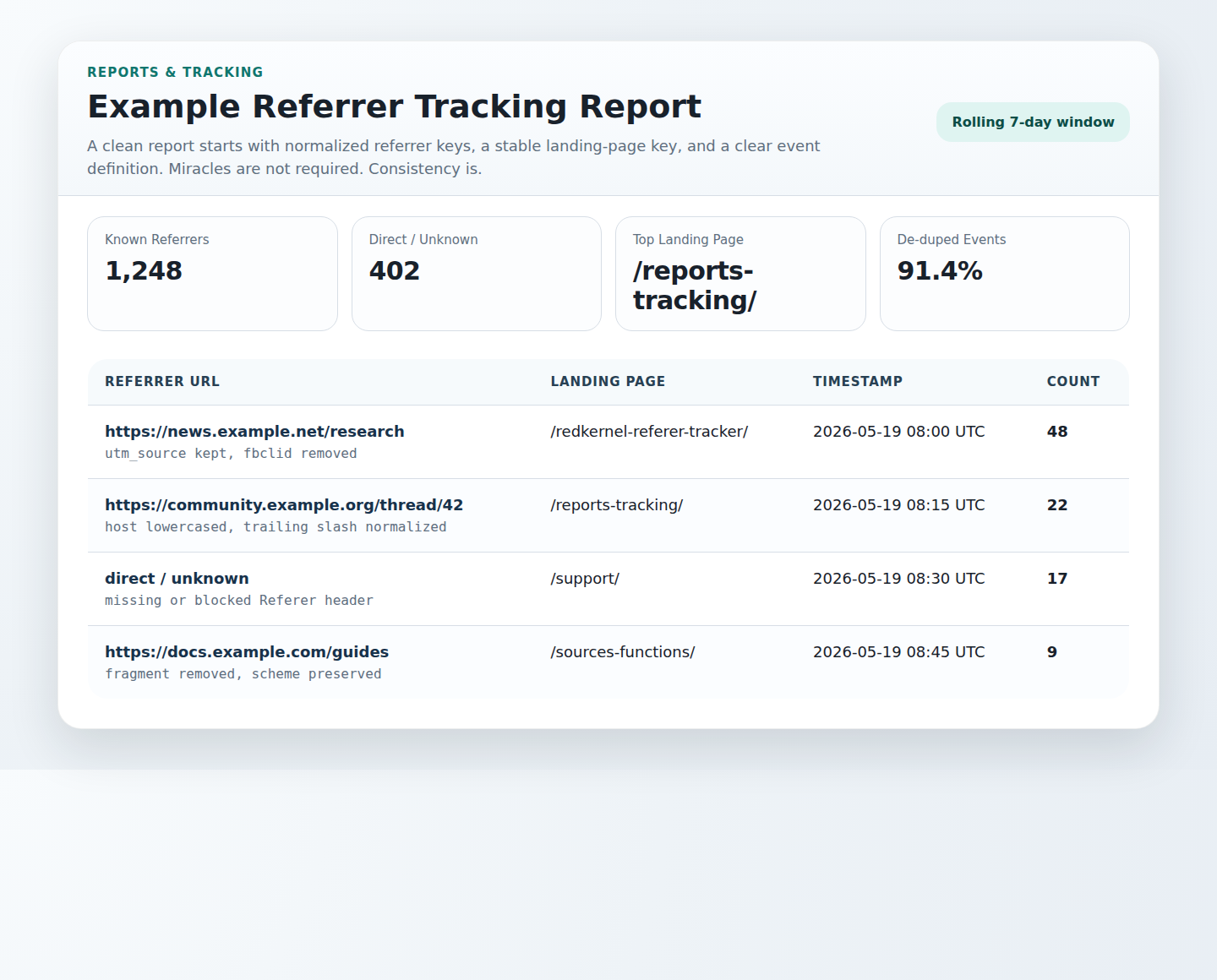
If you’re already tracking referrers via a dedicated script or dashboard, start by verifying what fields your current log actually stores. For more on reporting design, see Reports & Tracking and, for a related stats view, /rkrt/rkrt_stats.php.
When to anonymize, truncate, or exclude data
Here are practical rules for “keep it useful, keep it small”:
1) Truncate query strings and long referrer values
Referrer URLs often include query parameters that can be long and, in some cases, sensitive. If the goal is reporting (“what drove traffic?”), you usually don’t need the entire query string.
- Truncate length (e.g., keep only the first N characters).
- Drop query strings for referrer logging if you can still distinguish meaningful sources via domain/path.
2) Remove or avoid storing full URLs when they don’t add value
For landing pages, the path is often enough. For referrers, the domain is usually the highest-value dimension.
3) Anonymize by aggregation
If you only need counts, store aggregated counts rather than per-event rows. Aggregation reduces operational burden and limits exposure.
4) Exclude high-risk fields
A common “don’t do this” list:
- No passwords, tokens, or authentication parameters (if present, drop them immediately).
- No full referrer query strings unless you’ve explicitly decided they’re necessary and safe.
- No client IP logging for “basic referrer reporting” use cases.
If you keep logs at all, document retention and access clearly and keep the data handling in line with your site’s privacy expectations. For a general support path, use Support.
How to reduce noisy or misleading entries
Referrer data can be messy. The fix is normalization plus cautious interpretation.
Normalize domains and paths
- Lowercase hosts.
- Strip default ports.
- Normalize trailing slashes.
Decide what to do with “direct” and empty referrers
Empty or missing referer values can mean direct navigation, blocked headers, or cross-site privacy behavior. Rather than forcing a guess, treat it as its own category (e.g., “direct/unknown”).
Deduplicate intelligently
Decide whether you’re counting:
- First arrival (one per session), or
- Page views (every hit).
Then keep that definition consistent. If you mix approaches, your “top referrers” will drift for no obvious reason.
Watch for self-referrals
Sometimes you’ll see the same site as the referrer (e.g., internal navigation). If your reporting goal is external discovery, filter internal referrers or subtract them from “external” totals.
A minimal logging model for small sites
If you want a simple, privacy-conscious design, you can model your referrer logging like this:
| Purpose | Store | Don’t store |
|---|---|---|
| Find traffic sources | Referrer domain + truncated path | Full referrer URL query strings |
| Understand what was viewed | Landing page path | Full landing URL with sensitive params |
| Report over time | Hourly or daily buckets | Per-event high-resolution timestamps (if not needed) |
| Keep the system readable | Aggregated counts | Per-user identifiers |
One practical next step: start with domain + landing page + time bucket + count. Only add more detail when you can explain exactly what decision it improves—and when you can justify the additional data you’re collecting.
For a broader look at building AI into operational workflows, a neutral overview is available here: AI Integration Services | Integrate AI Into Business Workflows.
FAQ
Why don’t I always see referrers?
Browsers and privacy tools can block or limit the Referer header. Also, some navigation types don’t send a referrer value. In those cases, you’ll typically see empty or “unknown/direct” entries.
Why don’t numbers match my analytics tool?
Different tools use different definitions (sessions vs page views, bots filtering, event timing, and normalization). A lean referrer log can still be valuable—just compare like-for-like definitions.
Can I make referrer tracking perfectly accurate?
No web measurement system is perfectly accurate across all browsers and privacy settings. The goal is consistent, actionable reporting—not total certainty.
Conclusion: keep it lean, keep it honest
- Use domain + landing page + time buckets + counts as your default.
- Truncate and exclude query strings unless you’re sure they’re safe and truly needed.
- Normalize and treat empty referrers as “direct/unknown.”
- Aggregate where possible to reduce operational and privacy burden.
If you’d like help reviewing your existing referrer logging setup, reach out via Support.
External reading (helpful references):