When a link, form, or log line breaks after you “encode” something, the problem is usually not the data itself. It is the output context. URL encoding, HTML escaping, hashing, and encryption solve different problems, and the last one you apply still has to match where the value will appear.
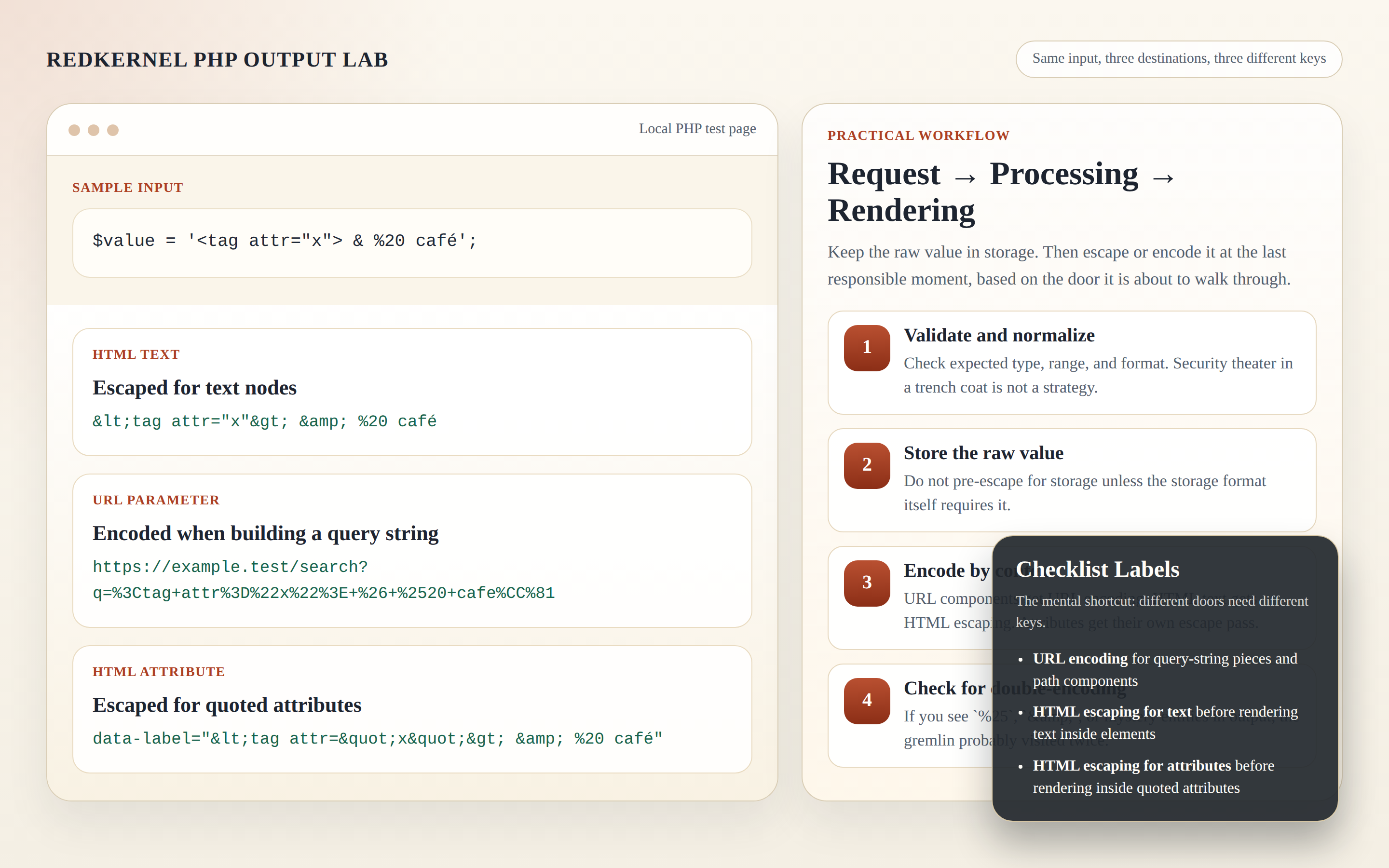
Before the details, keep one rule in mind: encoding changes representation, hashing checks integrity, and encryption protects confidentiality. None of them automatically makes a value safe for HTML, a query string, a database row, or a log file. That final step still depends on context.
Quick guide: what to use where
| What you are producing | Use | What it is for |
|---|---|---|
| Query string value | URL encoding | Preserve special characters in links and forms |
| HTML text or attribute | HTML escaping | Keep markup from breaking and reduce XSS risk |
| Password verification | Hashing | Check a secret without recovering it |
| Secret you need to read later | Encryption | Protect confidentiality while keeping recovery possible |
| Debug log or report line | Redaction first, then minimal logging | Keep useful context without storing secrets |
The PHP manual pages for rawurlencode() and htmlspecialchars() are worth keeping handy. They are short, precise, and much less dramatic than a broken checkout link.
Mistake #1: Double-encoding URLs
The classic symptom is a string that looks like %2520 instead of %20. Another clue is a form field that is saved, decoded, and then encoded again before it is rendered. The browser did not fail you; the pipeline did.
- Encode once, at the final boundary.
- Keep the raw value in storage and in application logic.
- Only encode when the value becomes a URL or query string.
For path segments, use PHP’s rawurlencode(). For query parameters, http_build_query() is often easier to read and less error-prone than hand-building ampersands. If you need a quick way to strip noise from a stored link after you have normalized it, use Remove URL as a cleanup tool, not as a substitute for proper encoding.
$term = $_GET['q'] ?? '';
$href = '/search?' . http_build_query(['q' => $term, 'page' => 1], '', '&', PHP_QUERY_RFC3986);
Mistake #2: Using HTML encoding where URL encoding is required
HTML escaping and URL encoding are cousins, not twins. If you put " into a query string, you have not made the URL safer; you have just changed the characters. If you put %26 into visible HTML text, the page may still display, but the value is no longer doing the job you wanted.
Think of the boundary like this: first make the link or form value valid for the URL layer, then escape the finished attribute value for HTML.
$query = http_build_query(['q' => $term], '', '&', PHP_QUERY_RFC3986);
$href = '/search?' . $query;
echo '<a href="' . htmlspecialchars($href, ENT_QUOTES, 'UTF-8') . '">Search</a>';
The distinction matters because browsers do not read your intent. They read the final characters.
Mistake #3: Encoding for the wrong output context
A value can be safe in one place and unsafe in another. Plain text, attribute values, URLs, JSON, and JavaScript strings all have their own rules. A link in a paragraph and a link inside a quoted href attribute are not the same output problem.
- Use HTML escaping for visible text nodes.
- Use HTML escaping with quotes for attributes.
- Use URL encoding for query values and path segments.
- Do not assume a value that looks clean in one context is safe everywhere else.
The PHP manual entry for htmlspecialchars() is the right reference point here. If you are rendering a URL into HTML, you often need both steps: build the URL correctly, then escape the final HTML attribute.
Mistake #4: Logging raw user input or decoded secrets
Logs are useful because they are readable. That is exactly why they become a problem when they are full of passwords, reset links, session IDs, API keys, or raw form payloads. Decoding a secret “just for debugging” does not make it less secret.
A practical logging checklist is usually enough:
- Log route, status code, request ID, and timestamp.
- Redact passwords, tokens, one-time codes, and full session values.
- Trim or whitelist query parameters before logging URLs.
- Store the minimum that helps you reproduce the bug.
- Keep detailed debug logs short-lived and access-controlled.
The OWASP Logging Cheat Sheet is a useful reminder that good logs are selective, not exhaustive. If you also track referral or source traffic, keep that data in a reporting view such as RKRT statistics, not in a general-purpose application log.
Mistake #5: Treating hashes as reversible
A hash is not a locked box. It is a fingerprint. You can compare fingerprints, but you cannot “decrypt” one back into the original value. That is why hashing is the right fit for verification and encryption is the right fit for recoverable secrets.
For passwords, use password_hash() and password_verify() instead of inventing a reversible shortcut. For anything you will need to read later, use encryption. The wrong tool here creates confusion first and data loss later.
// Verification: compare, do not reverse.
$valid = password_verify($password, $storedHash);
Mistake #6: Encrypting without consistent key and IV handling
Encryption fails quietly when the surrounding data is inconsistent. The cipher may be fine, but if the key changes, the IV changes unexpectedly, or the ciphertext format is not stored in a predictable way, decryption turns into guesswork.
Keep the pieces together. A safe structure usually includes the cipher version, the encrypted payload, and any metadata required to reverse it later. If you base64-encode binary output for transport, remember that base64 is only packaging; it is not the security layer.
- Use one agreed cipher and version it.
- Store or transmit the IV and authentication tag alongside the ciphertext.
- Keep the key management process separate from the application log.
- Test decryptability before you rely on the format in production.
The PHP manual for openssl_encrypt() is the right place to check the expected inputs and outputs. The question is not whether the bytes are encrypted. The question is whether the future code can still understand them.
Mistake #7: Confusing “encoded” with “safe”
This is the quiet mistake that slips into reviews. A value can look transformed and still be unsafe in the next context. Base64 is not confidentiality. URL encoding is not HTML escaping. HTML escaping is not a database safety mechanism. Every layer still needs its own boundary check.
The best habit is simple: encode for transport, escape for display, hash for verification, encrypt for confidentiality, and log only what you can afford to keep.
If a value must travel through multiple layers, apply each transform once and in the right order. Then do not touch it again unless you are reversing the exact matching step.
A practical debugging workflow
- Reproduce the failure with one known input.
- Identify the output context: URL, HTML text, HTML attribute, log line, hash check, or encrypted payload.
- Choose the transform that belongs to that exact context.
- Add a test for the exact broken case and the exact fixed case.
- Verify round-trips only where round-trips make sense: URLs should render correctly, hashes should verify, and encrypted values should decrypt with the right key and metadata.
That is usually enough to separate a data problem from a presentation problem. If you want more practical write-ups like this, see the Blog, or start from the home page and work toward the tool that matches the job. When a problem still refuses to narrow down, Support is the safer next step than another round of guesswork.
For teams deciding where AI fits in a broader debugging or QA routine, AI consulting services can help turn that into a practical plan.
Good output handling is rarely glamorous. It is mostly the quiet work of using the right transform once, at the right boundary, and then leaving it alone. That is usually enough to keep links clickable, forms readable, and logs useful without becoming a liability.