A referrer report can be either useful or exhausting. A lightweight one is the version that answers the day-to-day questions without turning into a spreadsheet dump.
\n\n
If you're searching for this, you probably want the short answer to a few questions: What fields actually matter? How should I group sources without hiding detail? Which filters keep the report readable? What should I avoid to prevent duplicate entries? For a reality check on how fragile browser-side source data can be, the browser-side Referer header is explicitly optional and inconsistent depending on privacy behavior, redirects, and policies. And for report-view safety, OWASP's guidance on logging emphasizes that logs and stored report data are security-sensitive.
\n\n
In this article, I'll map a “first screen” design that small teams can trust: the core metrics to show immediately, the grouping strategy that keeps counts honest, and a filter set that helps you find issues fast. You'll also get a simple layout you can copy as a starting point, plus a checklist for keeping your report quiet (not noisy).
\n\n
By the end, you'll be able to evaluate an existing referrer report—or design a new one—so it turns into day-to-day decisions instead of occasional curiosity.
\n\n
\n\n
Quick note: the exact fields and naming depend on how you capture referrers in your app. The goal here is usability: show enough signal that someone can act within minutes.
\n\n
Core metrics that belong on the first screen
\n\n
A lightweight referrer report should let you answer the top questions before you scroll. Think in terms of “what changed?” and “where do I look next?”
\n\n
| First-screen item | What it answers | Example follow-up |
|---|---|---|
| Top sources (grouped) | Which external places are actually driving visits? | Check partner links, campaign tags, or sudden partner outages |
| Top landing pages (grouped) | What content is being found? | Confirm the right page is indexed/linked; spot broken routes |
| Direct / unknown bucket | How much traffic lacks a usable referrer? | Verify capture logic and label the “unknown” reality |
| Self-referrals & internal noise bucket | Is the site feeding itself, via redirects or internal links? | Review redirect chains and internal host allowlists |
| Parse / validation outcomes | Are you counting what you think you're counting? | Fix malformed inputs that would otherwise split groups |
\n\n
That's the “day one” set. If you need more, add it only after the first screen is reliable.
\n\n
How to group sources without hiding detail
\n\n
Grouping is where referrer reports either become trustworthy—or start telling a cleaner story than the data supports.
\n\n
Use stable keys. For sources, a practical stable key is typically normalized referrer host (lowercased, trimmed, and validated). For pages, use a canonical landing path so the same destination doesn't appear as multiple variants.
\n\n
- \n
- Normalize once, group downstream. Treat raw input as evidence; store normalized keys for counting.
- Limit path detail to what you need. Landing page grouping can use paths; referrer path detail is often debug-only.
- Label uncertainty. If headers are missing because privacy policies or redirects stripped them, your report should show it as “unknown,” not pretend it's a known source.
- Prefer allow-lists over guesswork. Query parameters are a common source of duplicates. Allow-list only parameters that are truly meaningful for your use case.
\n
\n
\n
\n
\n\n
One simple rule that prevents duplicate entries: if you wouldn't want a new metric to appear just because of casing, whitespace, a trailing slash, or percent-encoding, then you shouldn't let those differences create separate buckets.
\n\n
Useful filters: date range, page, and source type
\n\n
Filters exist to help you make quick decisions. They should narrow the report without forcing you to become a data analyst.
\n\n
Date range
\n\n
Give at least two time windows (for example: last 7 days and last 30 days) plus an easy “custom” option. Keep time buckets consistent (UTC or a clearly documented local standard) so counts don't drift.
\n\n
Page (landing path)
\n\n
Let the user select a landing page (path) from the existing top list, not by typing free-form strings. That keeps the filter from creating “zero results” confusion caused by tiny path mismatches.
\n\n
Source type
\n\n
Source type filters should be based on your report's buckets: external top sources, direct/unknown, and self-referrals/internal noise. This is how lightweight reports stay readable: you're filtering by meaning, not by raw string fragments.
\n\n
Avoiding noisy reports and duplicate entries
\n\n
Noise usually comes from one of three places: inconsistent normalization, unbounded parameter capture, or “silent failures” where invalid inputs still get counted.
\n\n
- \n
- Keep normalization deterministic. Decide how you handle trailing slashes, fragments, and percent-encoding—and apply it the same way every time.
- Use a rejection bucket. If parsing fails or validation rejects a value, route it to an explicit “rejected/invalid” outcome instead of inventing a hostname.
- Make missing data honest. Direct/unknown isn't an error; it's information. Label it clearly so it doesn't get mistaken for “no traffic.”
- Expose parse outcomes. A small “validation errors” indicator tells readers whether counts are complete or potentially distorted.
\n
\n
\n
\n
\n\n
If you want the surrounding design ideas, the site's Reports & Tracking overview explains the broader workflow, while rkrt_stats.php provides a practical look at how the tracking view can be kept simple enough to read quickly.
\n\n
A simple layout for quick review and follow-up
\n\n
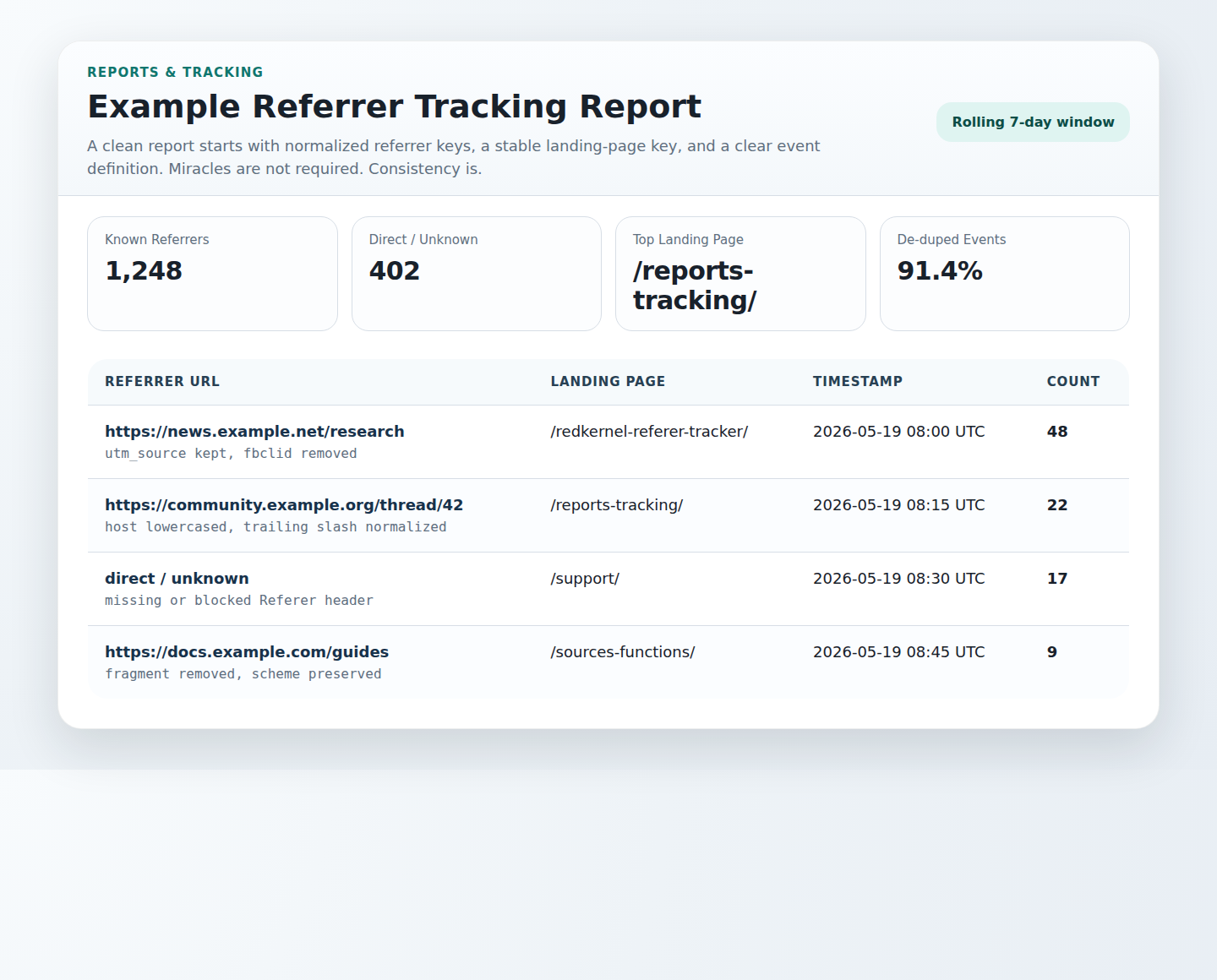
Here's a layout that tends to work for small teams because it's “one screen, one decision.”
\n\n
- \n
- Top row cards: Top sources, Top landing pages, Direct/unknown, Self-referrals/internal noise
- One main table: A concise breakdown by source (or by page), limited to a small number of rows (for example, top 10) for the selected date range
- Small validation note: A visible indicator of rejected/invalid parsing outcomes
- Filters bar: Date range + Page + Source type
\n
\n
\n
\n
\n\n
When you need help diagnosing mismatches, don't guess. Send questions to the team or check Support so report logic issues become actionable support items rather than repeated “why do the numbers look wrong?” threads.
\n\n
Wrap-up: the lightweight referrer report checklist
\n\n
- \n
- First screen includes top sources, top landing pages, direct/unknown, self-referrals/internal noise, and validation outcomes.
- Grouping uses stable, normalized keys (host and canonical landing path) and allow-listed parameters only.
- Filters support real decisions: date range, landing page, and source type.
- Noise control comes from deterministic normalization + explicit rejection buckets + honest missing data labels.
- Layout is boring by design: one table, compact cards, and an obvious follow-up path.
\n
\n
\n
\n
\n
\n\n
Next question for you: on your current report screen, which single metric would you delete first because it doesn't change what you do tomorrow?
\n\n
Resources: MDN: Referer header and OWASP Logging Cheat Sheet.