HTML encoding is one of those small changes that quietly does big security work—especially when your PHP app takes input from users and then prints it back into the page.
If you’ve ever wondered why your output is safe sometimes and risky other times, here are the questions people usually search for: What exactly counts as HTML encoding? How does encoding stop XSS? Where do you apply it in PHP—before or after you build HTML? and what are the common “double-escaping” traps?
In web security guidance, the core idea is consistent: treat untrusted input as data, not as HTML or browser instructions. The OWASP XSS Prevention Cheat Sheet calls out output encoding/escaping as a primary defense, and the PHP manual explains that htmlspecialchars is designed for safely converting special characters before output to HTML.
By the end of this article, you’ll have a practical mental map for what HTML encoding protects, when it doesn’t, and how to apply it correctly in PHP with clear examples you can reuse.
Table of contents
- What is HTML Encoding?
- How HTML Encoding Prevents XSS Attacks
- Best Practices for HTML Encoding in PHP
- Examples of HTML Encoding in Action
- Conclusion and Further Reading
What is HTML Encoding?
HTML encoding (also called HTML escaping) is the process of turning “special” characters into a safe representation that the browser will treat as text, not as HTML markup.
Concretely, encoding replaces characters like <, >, &, and quotes with their HTML entity equivalents (for example, < → <).
Here’s the short answer: HTML encoding protects the “HTML text context”—the part of your page where you expect to show user-provided content as readable text.
One important context warning
Encoding is not “one setting for everything.” The browser has different parsing contexts: HTML text, HTML attributes, URLs, JavaScript strings, CSS, etc. You must encode/escape for the context you’re actually inserting into.
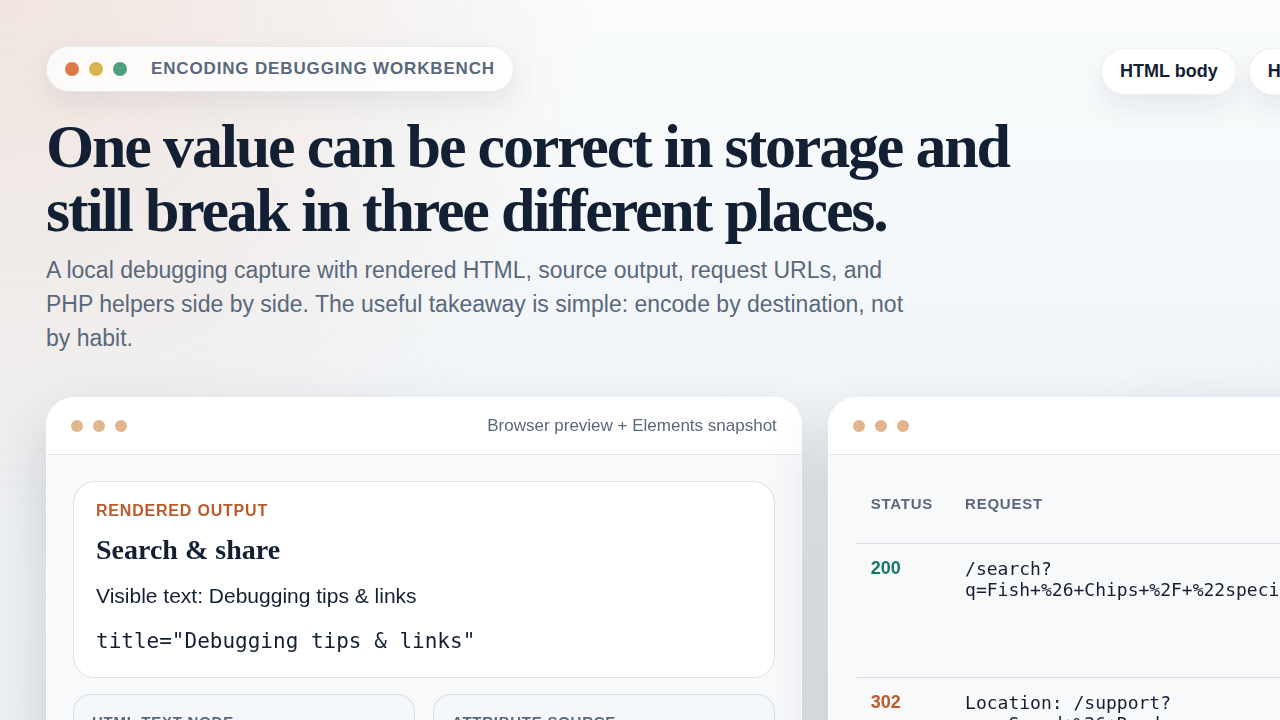
How HTML Encoding Prevents XSS Attacks
XSS (Cross-Site Scripting) happens when an application lets untrusted data be interpreted as executable code in the browser. The classic “reflected” example looks like: the user supplies a payload, and the server prints it back into the page.
HTML encoding blocks that chain at the output stage. When you encode the payload:
- The browser stops treating characters like
<as the start of a tag. - So markup like
<script>...</script>becomes harmless text. - The user sees characters on-screen instead of executing JavaScript.
Where it fits in the bigger defense picture
Encoding is not the only line of defense. OWASP also emphasizes input validation, proper output context handling, and avoiding dangerous sinks. But encoding is often the simplest, most reliable last-mile protection when your job is “render user content into HTML.”
If you want a reference that explains output encoding clearly, see:
OWASP’s XSS Prevention Cheat Sheet.
Best Practices for HTML Encoding in PHP
Here are practical rules that keep your code from slipping into the common “it looked safe but wasn’t” territory.
1) Encode at the moment you output
Don’t store an already-encoded string unless you have a strong reason and a clear labeling strategy. Encoding is easiest to get right when you do it right before rendering into HTML.
2) Use the right function for HTML text
In PHP, htmlspecialchars() is the typical choice for escaping text that will be inserted into HTML.
- It converts special characters to HTML entities.
- It helps prevent the browser from interpreting your text as markup.
Reference: PHP manual: htmlspecialchars.
3) Set the correct character encoding
Use the intended charset (commonly UTF-8) consistently. Mismatched encodings can lead to surprising edge cases where the browser and server disagree on what the characters mean.
4) Avoid double-escaping
If you encode twice, your output often becomes visibly wrong (for example, & showing up instead of &). Double-escaping is not just a display issue—it’s a sign that you’re encoding in the wrong layer or at the wrong time.
5) Never treat encoded output as “validation”
Encoding prevents interpretation as HTML, but it doesn’t make the input “clean” for other contexts. If you later place the same value into an attribute, a URL, or a script block, you may need different escaping rules for those contexts.
Examples of HTML Encoding in Action
Example 1: Displaying a user comment as text
Goal: show the comment exactly as typed, including characters like < and ".
<?php
$comment = $row['comment']; // untrusted input
$safe = htmlspecialchars($comment, ENT_QUOTES, 'UTF-8');
?>

<div class="comment">
If a user submits <script>alert(1)</script>, the browser will render it as text, not execute it.
Example 2: Building a small HTML snippet safely
When you construct strings, it’s easy to accidentally “flip contexts.” A safe pattern is: encode everything that goes into HTML text, then assemble.
<?php
$name = $row['display_name'];

$safeName = htmlspecialchars($name, ENT_QUOTES, 'UTF-8');

echo "<p>Welcome, {$safeName}!</p>";
?>
Example 3: Why you can’t “HTML-encode your way out” everywhere
If you place user content into an HTML attribute, you still use escaping—but you must think about attributes specifically (quotes, and context-specific encoding). Encoding must match the insertion point.
| Where you insert data | What encoding/escaping you usually need |
|---|---|
| HTML text (inside a tag) | HTML escaping (e.g., htmlspecialchars) |
HTML attribute values (like title="...") |
HTML escaping with quotes handled (e.g., ENT_QUOTES) |
| URL parts | URL encoding (percent-encoding) for query/path components |
| JavaScript strings | JavaScript string escaping rules (not HTML escaping) |
Conclusion and Further Reading
HTML encoding is a simple idea with strong practical value: it converts user-controlled characters into safe text so the browser doesn’t interpret them as HTML. If you treat encoding as a last-mile step at output time—and match the encoding to the context—you remove a major XSS risk from many common PHP rendering flows.
Quick next step: If you’re working on output-heavy PHP pages (comments, search terms, profile fields), audit the handful of places where you echo user data and make sure each one uses the correct escaping for its output context.
Further reading:
- OWASP: XSS Prevention Cheat Sheet
- PHP manual: htmlspecialchars
- MDN: HTML entities
- OWASP: Cross-site scripting (XSS) overview
You might also find it useful to browse the site’s general security/resource sections like Support and Sources/Functions....