Referrer tracking gets much easier once you stop treating the HTTP Referer header like gospel and start treating it like what it is: optional, noisy, and entirely capable of lying to your dashboard with a straight face.
If you are trying to understand referrer data, you are usually asking a practical set of questions: What does the HTTP Referer header actually tell me? Why is it missing so often? What should I store, what should I drop, and how do I report the result without building a privacy problem disguised as analytics? Those are the right questions. “Just track everything” is not a strategy. It is a confession.
For broader planning context, teams can compare guidance from web.dev guidance before choosing a workflow.
Here is the mental model for the whole article: referrer tracking is useful only when you define the event you care about, capture it server-side, validate it like any other untrusted input, normalize it into stable grouping keys, and report it with enough restraint that you do not preserve every stray token and query parameter forever. The goal is not perfect reconstruction. The goal is a reliable summary of how people reached a landing page.
For readers who want the broader toolkit around this topic, the home page collects the main sections, the RedKernel Referer Tracker page connects directly to the tracker topic, the FREEWARES section covers adjacent utilities, and the Support page is the place to continue the conversation when your logs decide to become interpretive fiction.

What “referrer” means in web traffic
The first useful distinction is simple: the HTTP Referer header is not the same thing as internal navigation paths inside your application. A referrer is an HTTP request header that may tell your server which page the browser was on before the current request. Internal navigation paths are the route changes or page transitions inside your own site or app. Those are related concepts, but they are not interchangeable.
Related implementation details are also covered in MDN Web Docs, which helps keep tool decisions grounded in established practices.
Why does that distinction matter? Because the header is external evidence observed by the server on an incoming request, while internal navigation paths are part of your own application logic. If a user moves from /freewares/ to /reports-tracking/ inside your site, that is an internal path transition. If they arrive at your site from another page and the request includes a Referer header, that is referrer data. Mixing the two creates reports that look comprehensive and behave like fiction.
A second term worth fixing in place is landing page. In referrer reporting, the landing page is the page where the visit enters your site for the metric you are using. If you are measuring pageviews, it is the first pageview you record for that visit. If you are measuring sessions, it is the first page associated with the session key. Same visitor, different metric, different counts. Software enjoys precision when you give it any.
The header is also optional. It may be missing because the visitor typed the URL directly, opened a bookmark, moved through privacy-protecting software, or crossed a redirect chain that changed what survived to the final request. That is why a sensible reporting system keeps a separate bucket for direct / unknown instead of pretending the absence of a header is a bug to be creatively explained away.
What you can and can’t reliably track
You can reliably track what your server actually observes on incoming requests: the landing page requested, the timestamp, the user agent or bot label if you keep it, and whether a Referer header was present. You can also reliably track the normalized version of that header after validation. That is the good part.
You cannot reliably reconstruct an exact human journey across browsers, privacy settings, redirect hops, and client-side transitions just from referrer data. You also cannot assume the same behavior across every browser or tool. Some visitors will send the full referrer URL. Some will send only part of it. Some will send nothing. Some requests will be bots. Some will be your own internal traffic if you fail to exclude it. None of this is dramatic. It is just the normal shape of reality on the web.
Blocked or modified headers are common enough that they should be treated as part of the design. A reporting system that only works when every browser behaves identically is not a reporting system. It is a wish. Label missing values as direct / unknown, measure how much traffic lands in that bucket, and treat that percentage as a quality signal for your data rather than an insult to your ambition.
Self-referrals belong in the same expectation-setting bucket. If your own pages appear as top referrers, you probably have an implementation issue, a redirect pattern you did not filter, or internal links hitting the tracker in ways you did not define clearly. This is where the Reports & Tracking section becomes relevant: reporting is not just aggregation; it is deciding which traffic belongs in the story you are trying to tell.
A safe data capture checklist
The safest approach is server-side first. Read the Referer header from the server request environment, not from a client-side field you invited the browser to send back. That does not make it trustworthy. It just avoids adding another layer of user-controlled input dressed up as telemetry.
When you capture referrer data, keep the stored record lean. In most cases you need:
- Timestamp: when the event was observed.
- Landing page key: the normalized route or URL path on your site.
- Referrer key: the validated and normalized referrer host/path or labeled
direct / unknown. - Count key: the deduplication or aggregation key used to avoid inflating the same event repeatedly.
- Optional flags: bot label, self-referral flag, or request class if your reporting needs them.
That is enough to build useful summaries. You do not need to preserve every raw query string, every campaign token, or every full external URL forever. Minimal fields make the later privacy conversation much shorter, which is a rare gift.
Validate the header like untrusted input
Treat the raw header value as untrusted text. Cap length before parsing. Attempt URL parsing using a strict, boring function in your server language. Reject malformed values instead of “fixing” them into something clever. If parsing fails, store the event as invalid / dropped or route it into the same quality-control bucket you use for direct and unknown traffic.
Good validation rules usually include:
- allow only expected schemes such as
httpandhttps, - lowercase and validate the host after parsing,
- discard fragments,
- reject absurdly long values, and
- avoid storing raw values that contain obviously sensitive parameters.
The point is not to become suspicious of every string in the universe. The point is to prevent malformed or hostile values from contaminating your logs, reports, or export views.
Use allow and deny rules
Referrer data becomes more useful when you define what belongs in the report. Internal hosts should usually be filtered into a self-referral bucket or excluded entirely from top-referrer rankings. Query parameters that contain tokens, email addresses, session identifiers, reset codes, or similar sensitive data should be stripped before storage. You may decide to keep marketing parameters such as utm_source for grouping, but even that should be a deliberate choice rather than a default hoarding instinct.
A practical allow/deny checklist looks like this:
- Allow: scheme, host, path, and a very short list of reporting-relevant parameters if your team truly needs them.
- Deny: fragments, tokens, emails, session IDs, password-reset parameters, and internal hosts in public ranking tables.
- Label separately: direct / unknown, bots, self-referrals, and invalid headers.
That single design choice usually improves the usefulness of reports more than any dashboard color palette ever will.
Draw privacy boundaries early
Referrer logging gets risky when it quietly becomes a long-term archive of other people’s URLs. Decide upfront what you will not store. In many implementations, the safest default is to store a normalized host and path, optionally a short allow-listed parameter set, and drop the rest. If you need raw values briefly for debugging, keep them for a short retention window and keep them out of visitor-facing reports.
For teams building adjacent internal tooling, a web app generator can help scaffold a private operations dashboard quickly, but the dashboard still needs the same privacy boundaries and validation rules. Architecture does not absolve policy. It just gives policy somewhere cleaner to live.
Normalization tips for cleaner reporting
Normalization is the difference between “thirty versions of the same source” and “one grouped source you can actually reason about.” Define stable keys for grouping and apply them consistently over time. If you change the rules every month, your trend lines become decorative.
A stable referrer key often includes the parsed host, a normalized path, and a tightly controlled parameter subset. The raw value can exist briefly for debugging, but the report key is what should drive grouping.
| Normalization step | What it prevents | Typical decision |
|---|---|---|
| Safe URL decoding | Duplicate keys caused by multiple textual representations | Decode only where your parser and storage rules can handle it safely |
| Lowercase host | Example.com and example.com splitting counts |
Always lowercase host after parsing |
| Scheme handling | Inconsistent grouping across http and https |
Keep or collapse scheme based on your reporting needs |
| Parameter filtering | Noise from tracking parameters and sensitive values | Keep only a short allow-list such as selected campaign tags |
| Fragment removal | Meaningless splits caused by anchors | Drop fragments before storage |
| Slash normalization | Duplicate keys from trailing slash variation | Choose one canonical form and stick to it |
URL decoding deserves special caution. Decode only when your parsing and storage layer can do so deterministically. You are not trying to be clever with malformed data. You are trying to avoid duplicate groupings from harmless encoding differences.
Parameter handling is where many systems become clutter museums. Keep what you can justify. Drop what you cannot justify. If campaign parameters are useful, store only the subset you actually report on. If they are not useful, remove them before the data ever reaches long-term storage. The same logic applies to the utilities and references linked from Sources/Functions…: small functions become valuable when they enforce consistency, not when they preserve noise with more enthusiasm.
Validate and de-duplicate records
Before you count anything, define the event. Are you counting every request, every pageview, or every session entry? Those are different metrics, and they will disagree. That is normal. The mistake is switching definitions halfway through a report and then acting surprised when totals drift.
For a practical referrer report, pageview-level capture with a deduplication rule is often easier to reason about than raw request counts. A simple unique key might combine:
- a short timestamp bucket,
- the normalized landing page key,
- the normalized referrer key, and
- an optional visitor/session hint if you already track one responsibly.
The idea is to avoid counting repeated requests for the same effective event during a very short window. Asset fetches, retries, refreshes, or noisy redirects can all inflate totals if you count every request without context. De-duplication does not make the data perfect. It makes the data less gullible.
Redirect chains deserve their own note. One user action can produce multiple requests, and those requests may arrive with different referrer behavior. Decide whether your tracker logs the final landing request only, logs the first eligible request in the chain, or keeps a debug-only trace outside the main report. Write that rule down. Hidden rules produce very visible confusion later.
Session counts differ from pageview counts because sessions collapse multiple views into one entry point. If a reader lands on a page once and then browses five pages internally, a session-level report may show one referrer event while a pageview report may show one eligible landing pageview and several internal transitions with no business appearing in the referrer report. Again: define the event, then keep that definition stable.
Reporting ideas: from raw logs to useful summaries
Once the data is normalized and deduplicated, the reports can stay pleasantly plain. You do not need an overproduced dashboard to make this useful. A few stable tables and time windows often tell the truth better than a wall of animated circles.
The most useful starter reports are:
- Top referrers by count: grouped by normalized referrer key.
- Top landing pages by referrer: a matrix that shows which sources deliver visitors to which entry pages.
- Daily or weekly trends: rolling windows that smooth short spikes.
- Direct / unknown share: a separate quality-control view showing missing or blocked referrer rates.
- Bot vs human split: if you have a reasonable labeling rule, keep automation out of the human-facing summary.
A simple export-friendly schema works well for many teams:
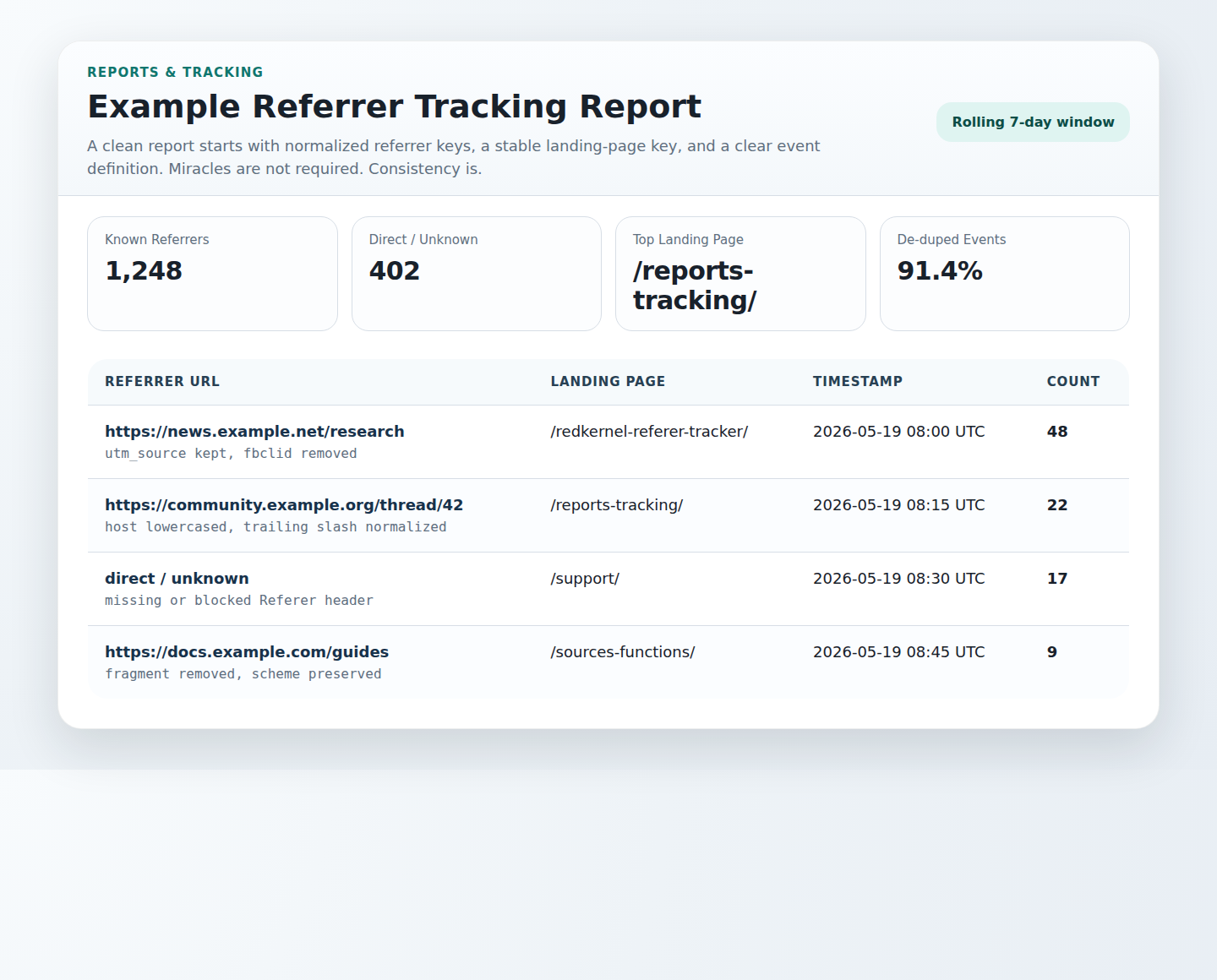
| Referrer URL | Landing Page | Timestamp | Count |
|---|---|---|---|
| Normalized referrer key or direct / unknown | Canonical landing page key | Bucket start or event timestamp | Aggregated total for the key |
That format is simple enough for CSV export, internal review, or a lightweight dashboard tied into the site’s Reports & Tracking workflow. It also makes mismatches easier to explain because each column is explicit about what it represents.
Common mistakes to avoid
- Trusting the raw header: the header is useful, but it is still untrusted input and must be parsed and validated.
- Logging sensitive query strings: tokens, emails, and session identifiers have no business living forever in a referrer report.
- Over-collecting raw data: if you only report on grouped keys, store grouped keys. Raw forever is laziness with storage attached.
- Changing normalization rules midstream: historical comparisons break when yesterday and today use different grouping logic.
- Ignoring bots and self-referrals: they will happily become your “top sources” if you let them.
- Counting requests when you mean pageviews or sessions: choose the metric first, then build the tracker around it.
This is also why implementation support matters. If your team is troubleshooting mismatched totals or tracker edge cases, the Support page gives readers a direct path to continue the work instead of arguing with a spreadsheet in private.
Quick implementation outline for PHP
This article is not a paste-and-run recipe, because that would encourage exactly the kind of unexamined logging you are trying to avoid. It is a high-level workflow you can implement safely in PHP or any similar server stack:
- Read the request header server-side. Capture the raw
Referervalue from the server request environment when the landing-page event occurs. - Parse and validate. Enforce a length cap, parse the URL safely, reject malformed values, and limit schemes to what you support.
- Normalize into keys. Lowercase host, normalize path and trailing slash behavior, remove fragments, and keep only a deliberate parameter allow-list.
- Filter known noise. Detect self-referrals, label bots if you maintain that logic, and route missing values into
direct / unknown. - Store minimal fields. Save timestamp, normalized referrer key, landing page key, and the count or dedupe key. Keep raw values only if you have a short-lived operational reason.
- Aggregate on demand or on schedule. Build daily or rolling summaries for the report tables your team actually reads.
- Render reports safely. Escape output in admin views and exports, and avoid exposing raw sensitive values to anyone who does not need them.
That workflow maps cleanly to a tracker page, an internal report table, or a small monitoring dashboard. The sequence matters more than the brand of framework around it. Capture, validate, normalize, deduplicate, report. Skip one step and the system starts inventing personality.
FAQ
What about bots?
Bots should be labeled or excluded from human traffic summaries whenever you can do so reasonably. That may mean filtering known crawler patterns, maintaining a bot flag, or separating automation into its own report bucket. The important part is not pretending bot traffic is just “very enthusiastic marketing.”
Why do self-referrals appear?
Self-referrals usually appear when internal traffic is not filtered, redirects are misclassified, or the event definition is too broad. Treat your own hosts as a separate case during normalization and reporting so internal journeys do not pollute external source rankings.
Why do my numbers not match analytics tools?
Because different systems define events differently, deduplicate differently, treat sessions differently, filter bots differently, and encounter different levels of privacy blocking or redirect loss. Mismatch is normal. The useful question is whether your own method is internally consistent and well documented.
What should I do when the referrer is missing?
Label it as direct / unknown and move on. Missing referrer data is part of the web, not a personal attack. Track the size of that bucket over time, compare it with landing-page trends, and resist the temptation to invent a source where none was observed.
Final takeaways
Referrer tracking works best when you keep the ambition modest and the implementation disciplined. Capture what the server actually observes. Validate it. Normalize it into stable keys. Deduplicate by a clear event definition. Report only what you can defend. The resulting data will be incomplete in the cosmic sense, but it will be much more useful in the operational sense, which is the one that pays the bills.
If you want to prototype the workflow, start small: one landing-page event, one normalized referrer key, one direct/unknown bucket, and one weekly report table. Good systems usually begin as narrow systems with clear constraints. The vague versions are the ones that grow expensive opinions.