Encoding in PHP is not one magic spray bottle. It is more like a ring of labeled keys: one key for URLs, one for HTML text, one for HTML attributes, and a very cranky gremlin in the corner if you try to reuse the wrong one.
If you searched for this topic, you are probably trying to answer a few very normal questions: When should I use URL encoding instead of htmlspecialchars()? Why does a value look fine in one place and broken in another? How do I stop double-encoding from turning a clean string into visual soup? Those are the right questions. The boring magic here is that output safety depends on destination context, not on what felt “encoded enough” earlier in the request.
For broader planning context, teams can compare guidance from web.dev guidance before choosing a workflow.
This guide walks through a practical PHP workflow for output handling: validate input, keep raw values in your data model, encode or escape at the last responsible moment, and test the result with a handful of annoying characters that always reveal the truth. We will cover URLs, HTML text, HTML attributes, double-encoding, safer logging, and the small FAQ that clears up the usual confusion around Base64, MD5, and encryption.
For readers landing fresh on the site, the home page and the blog collect the wider toolkit. If you need help applying the checklist to a live script, the Support page is the direct path.
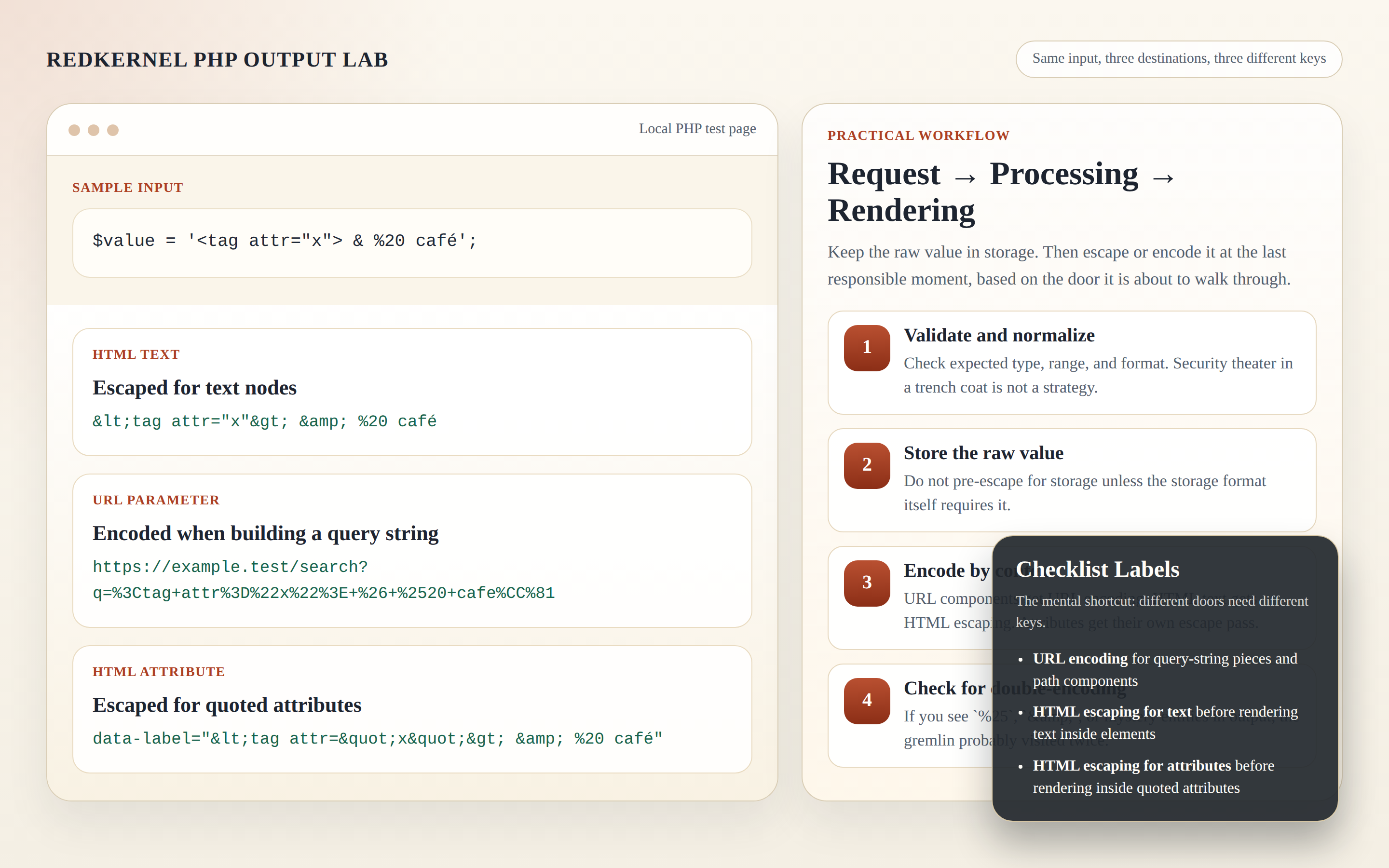
Why “encoding” is not one-size-fits-all
Here is the mental shortcut I want you to keep: encoding and escaping depend on where the value will land. A browser does not treat characters the same way inside a URL, inside HTML text, or inside an HTML attribute. The same input can be harmless in one place and messy or dangerous in another because each context has its own parsing rules.
Related implementation details are also covered in MDN Web Docs, which helps keep tool decisions grounded in established practices.
Think of it as three context gates:
- URL gate: characters inside query strings or path components may need percent-encoding so the browser and server read them as data instead of separators.
- HTML text gate: characters inside element content may need HTML escaping so the browser displays them as text rather than interpreting them as markup.
- HTML attribute gate: characters inside quoted attributes need attribute-safe escaping so quotes and special characters do not break the attribute boundary.
This is why “I already encoded it” is not a meaningful sentence until you add the missing part: encoded for what? Different doors need different keys. Using the URL key on the HTML door is how you end up with output that looks like a traffic accident in percent signs.
Quick decision tree: URL parameter vs HTML text vs HTML attribute
If you only remember one thing, remember this decision tree:
- If the value is becoming part of a query string or path component, use URL encoding at URL-construction time.
- If the value is going between HTML tags as visible text, escape it for HTML text right before rendering.
- If the value is going inside a quoted HTML attribute, escape it for attribute output right before rendering.
- If the same logical value appears in more than one context, encode or escape it separately for each context. Do not reuse one prepared string everywhere.
| Destination context | What you are protecting | Typical PHP approach | Timing rule |
|---|---|---|---|
| URL parameter | Separators like &, spaces, quotes, percent signs |
rawurlencode() for components or http_build_query() for query strings |
When constructing the URL |
| HTML text node | Characters interpreted as markup | htmlspecialchars($value, ENT_QUOTES | ENT_SUBSTITUTE, 'UTF-8') |
Right before rendering into element text |
| HTML attribute value | Quotes and markup-sensitive characters inside attributes | htmlspecialchars(...) with quoted attributes |
Right before rendering into the attribute |
The quiet rule under the table is the important one: do not store one pre-escaped version and hope it behaves everywhere. That shortcut always looks tidy for about six minutes.
Terminology in 60 seconds
Three terms get tangled constantly, so let’s untie them before the rest of the article does interpretive dance in your head. Validation checks whether the input matches what your application expects. Encoding or escaping prepares data for a specific destination so another system reads it as data, not control characters. Rendering context means the exact place where the value appears: URL, text node, attribute, log viewer, export, and so on.
That distinction matters because one step does not replace the others. A validated value can still break HTML if you render it raw. A URL-encoded value can still be wrong when dropped into an attribute without the surrounding HTML step. Clear labels reduce chaos, and this topic benefits from less chaos immediately.
URL encoding in practice, without summoning the double-encoding gremlin
URL encoding belongs to URL construction. That means query-string values, path segments, and other URL components get encoded when you assemble the final link. Not earlier in storage, not later after the URL is already complete, and definitely not twice because one layer of the stack got nervous.
A safe minimal example for a query parameter looks like this:
$params = ['q' => $searchTerm];
$url = '/search?' . http_build_query($params, '', '&', PHP_QUERY_RFC3986);
This approach lets PHP encode the query-string component correctly instead of asking you to hand-stitch separators. If you are working with a path segment rather than a query string, encode the segment itself:
$profileUrl = '/profiles/' . rawurlencode($username);The key habit is simple: keep the value raw until the moment you build the URL component. If the value is stored as already encoded text and then encoded again, the result can drift into double-encoding. That is the gremlin that keeps showing up with things like %2520 instead of %20. One pass turned a space into %20; a second pass encoded the percent sign itself.
Practical signs of double-encoding include:
%25appearing where you expected a normal percent-encoded value- query strings that look increasingly unreadable after every redirect or render cycle
- data pipelines where one layer says “I encode everything” and another layer says the same thing, like two people both locking the same bicycle to different fences
Rule of thumb: encode a URL component once, at the moment the URL is constructed, and treat the constructed URL as a final presentation value rather than a reusable raw string.
HTML entities vs “hiding” output: two different jobs
HTML escaping and output hiding are not the same job. They just wear similarly boring shoes.
HTML escaping exists so the browser displays special characters as text instead of reading them as markup. If a user enters angle brackets, quotes, or ampersands, escaping helps the browser show those characters literally in the page. This reduces risk when used correctly for HTML output contexts.
A safe minimal example for text output:
$safeText = htmlspecialchars($label, ENT_QUOTES | ENT_SUBSTITUTE, 'UTF-8');
echo '<p>' . $safeText . '</p>';
A safe minimal example for attribute output:
$safeAttr = htmlspecialchars($label, ENT_QUOTES | ENT_SUBSTITUTE, 'UTF-8');
echo '<button data-label="' . $safeAttr . '">Inspect</button>';
Those examples are intentionally small because the point is the pattern: escape for the exact HTML destination immediately before output, and keep the attribute quoted. Clunky interfaces love unquoted attributes because they enjoy chaos.
Hiding or obscuring output, on the other hand, is a presentation choice. You might mask part of an email address, collapse a token preview, or blur a value in the UI for privacy or readability. That can be useful for user experience, but it is not a substitute for escaping. Hiding changes what the reader sees. Escaping changes how the browser interprets characters.
That distinction matters for the site’s code-oriented resources too. Pages like Sources/Functions… are a natural place to think about code utilities, but utility does not excuse context confusion. The browser still wants the right key for the right door.
The “why is this still broken?” section
Most output bugs are not exotic. They are bookkeeping mistakes with very good marketing. Here are the common ones:
1. Mixing encoding layers in the wrong order
If you build a URL and place that URL inside HTML, you often have two contexts involved: URL construction and HTML rendering. The URL components should be URL-encoded during construction. Then, when the full URL is rendered into an HTML attribute like href, the attribute output should be HTML-escaped for that render step. That is not “double-encoding” in the bad sense; it is one encoding step per context.
2. Storing pre-escaped values
Pre-escaped storage creates confusion because nobody can tell whether the value is raw, HTML-safe, URL-safe, or already half-processed by an earlier request. That uncertainty is where visible entities like & and stray %25 sequences come from. Keep raw values in storage whenever practical, then prepare them when you actually render or build.
3. Reusing one prepared string in multiple contexts
A string escaped for HTML text is not automatically correct for an attribute, a JavaScript block, a CSS context, or a URL parameter. The safest workflow is to keep the logical value raw in your model and generate separate output versions for each destination.
4. Treating “looks fine in the browser” as proof
Browsers are polite until they are not. A value may appear readable in one path while still breaking links, confusing logs, or failing on edge characters. Visual comfort is not verification.
5. Forgetting logs are output too
If values end up in a browser-based log viewer, report, or admin table, those values still need context-aware output handling. The Reports & Tracking section is a good reminder that “internal” output is still output. Safe logging patterns reduce risk, but they do not turn escaping into somebody else’s problem.
Step-by-step workflow: request → processing → rendering
This is the workflow I recommend because it is repeatable, boring, and therefore useful.
1. Validate and normalize input
Check type, length, expected format, allow-lists, numeric ranges, and any application-specific rules. Validation answers: “Does this value fit what this field is supposed to contain?” It is not the same thing as output escaping, but it helps reduce chaos early.
2. Keep raw values in your data model
Store the canonical value in a consistent encoding such as UTF-8. Do not pre-escape for HTML just because you know the value might be displayed later. Future-you deserves fewer mystery strings.
3. Decide the destination context for each render point
Before you print anything, ask a very literal question: where is this value going right now?
- Visible text between tags
- A quoted HTML attribute
- A URL query parameter or path segment
- A log file, CSV export, or admin report
The answer determines the escaping or encoding method. Not habit. Not vibes. Not “we used this helper last week.”
4. Build URLs from components, not from pre-baked strings
If a value belongs in a query string, hand the components to a URL builder like http_build_query(). If it belongs in a path segment, encode the segment at the moment it is appended. Then treat the finished URL as a presentation value for that use.
5. Escape HTML for the exact output position
Render text nodes with HTML escaping. Render quoted attributes with HTML escaping as well, but treat them as their own output position and keep the quotes in place. Do not take a URL-encoded component and assume it is ready for raw insertion into markup without the surrounding HTML step.
6. Log safely and with restraint
Logs are useful, but they should not become a side-channel for sensitive data or a browser-rendered surprise later. Keep logs minimal, avoid storing secrets or unnecessary personal data, and remember that any browser-based log viewer still needs safe output rendering.
If your broader project includes scaffolding tools, a web app generator may speed setup, but it does not remove the need for context-aware escaping. The framework can hand you a room. You still have to label the doors.
Pre-flight checklist before deploying a PHP script
Use this as a quick review pass before you ship:
- Context inventory: Can I name the output context for every variable I render: URL, HTML text, HTML attribute, JavaScript, log, export?
- Last responsible moment: Am I escaping or encoding at render/build time rather than once in storage and then reusing it everywhere?
- Raw value preservation: Do I still have the canonical raw value available in the data model?
- Double-encoding check: Could this value already be URL-encoded or HTML-escaped before it reaches this line?
- Quoted attributes: Are attribute values quoted before escaped content is inserted?
- URL construction: Am I using a component-aware method for query strings and path segments instead of string concatenation roulette?
- Log hygiene: Am I avoiding sensitive data in logs, and are browser-visible log views escaped on output?
- Edge-character tests: Did I check spaces, quotes, angle brackets, ampersands, percent signs, and Unicode characters?
- No false guarantees: Does the code reduce common output issues when used correctly without pretending one helper solves every security concern?
Testing tips: quick edge-character checks
You do not need a cinematic testing setup to catch a lot of output mistakes. A small manual test set goes a long way.
Use sample values that include:
- spaces
- single and double quotes
- angle brackets like
<and> - ampersands like
& - percent signs like
% - Unicode characters such as accented letters or non-Latin scripts
Then verify the full path:
- In the browser, text should display as text instead of becoming markup.
- In attributes, quoted values should remain intact and not break surrounding markup.
- In URLs, query strings should look correctly encoded and should not grow suspicious
%25artifacts. - In reports or admin screens, special characters should remain readable without turning into visible double-escaped clutter.
This is also where related sections like Reports & Tracking and Support become useful. The first reminds you that data often gets rendered again later; the second gives readers a clear place to ask for help when a workflow still behaves like a haunted vending machine.
Short FAQ: Base64, MD5, and encryption are not output escaping
Does Base64 make output safe for HTML or URLs?
No. Base64 is an encoding format for transport or storage convenience. It can change the representation of data, but it is not a replacement for context-aware output escaping. A Base64 string may still need the correct handling for the place where you render it.
Does MD5 prevent XSS or database problems?
No. MD5 is a hashing algorithm. It does not solve output escaping, and it does not replace parameterized database queries. Hashing answers a different question entirely.
Does encryption solve browser rendering safety?
No. Encryption protects confidentiality when used correctly. It does not tell the browser how to interpret special characters after decryption and output. Escaping is still about output context. Validation is still about whether the input fits expectations. Database safety still relies on using parameterized queries and sane query construction rather than wishful thinking.
So what is the clean mental model?
Validation checks whether input belongs. Encoding or escaping prepares data for a specific destination. Hashing verifies or fingerprints. Encryption protects secrecy. They are neighbors, not twins.
Final shortcut
If you want the shortest version of this whole article, here it is: store raw, decide context, encode or escape late, test with ugly characters. That workflow will not guarantee perfection, because software enjoys surprises, but it does reduce common output problems when used consistently and correctly.
Try one small experiment the next time you touch a PHP view: pick a single variable that appears in a URL, in page text, and in an attribute. Trace it from request to output. If the same prepared string is doing all three jobs, you just found the bug farm.